
When a customer first contacts your business, a chain of events begins. If that chain is clear and consistent, you deliver work on time, invoice accurately, and get paid promptly. If it is messy, you end up with missing details, confused technicians, unhappy customers, and slow cash flow.
A well-designed field service workflow gives structure to every job. It makes it easier to train staff, monitor performance, and scale without adding unnecessary stress. With i4T Business, tradie businesses in Australia can manage the full end-to-end job management process in one system, from first call to paid invoice.
This article walks through a practical field service workflow example using i4T Business and explains how field service software works in day-to-day operations.
A strong workflow helps you:
- Capture every job consistently from the start
- Keep office staff, technicians, and customers aligned
- Reduce admin, double handling, and avoidable errors
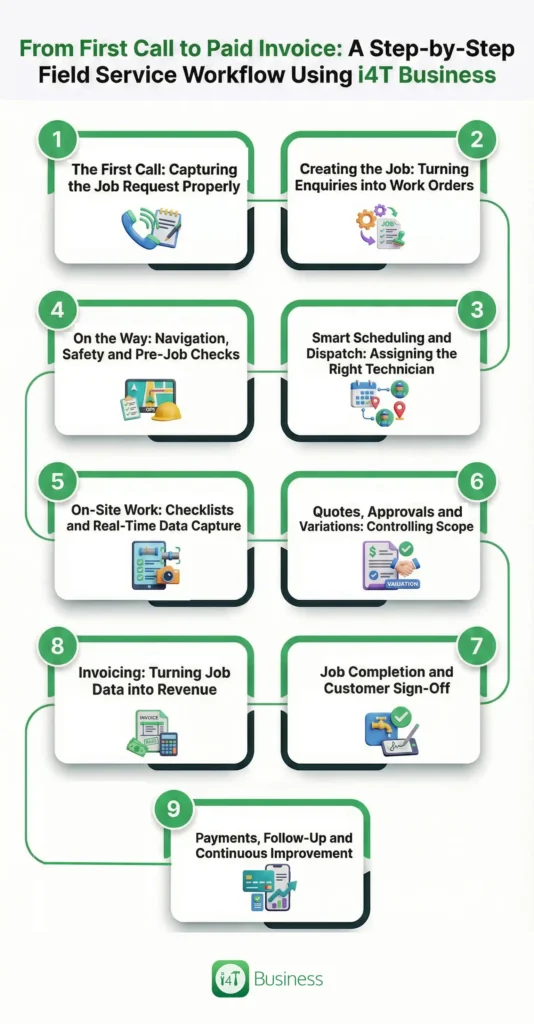
Step 1: The First Call: Capturing the Job Request Properly
The workflow starts the moment a customer phones, emails, or submits an online request. If this first interaction is handled well, everything that follows is easier. The goal is to gather accurate information once and store it where everyone can access it.
With i4T Business, office staff log enquiries directly into the platform while speaking with the customer. They create or update the contact, record the job location, and capture the main issue. Notes, photos, and any special instructions are stored against the enquiry instead of being scattered across emails and scraps of paper.
During the first call, your team should:
- Create or update the customer profile in i4T Business
- Record address, access details, and a clear description of the problem
- Set job type and priority (emergency, urgent, standard)
- Confirm expectations around response time and next steps
Step 2: Creating the Job: Turning Enquiries into Work Orders
Once the customer confirms they wish to proceed, the enquiry needs to become an actionable job.
In i4T Business, the enquiry can be converted into a job with a click. All relevant information transfers automatically, forming a single source of truth for everyone involved. Additional details, such as photos, documents, and internal notes, can be added so the technician has the context they need before they arrive.
When creating the job, you can:
- Pull enquiry details into a structured job record
- Attach photos, plans, or compliance documents supplied by the customer
- Add internal notes such as hazards, parking information, or codes
- Establish a clean starting point for the rest of the field service workflow
Step 3: Smart Scheduling and Dispatch: Assigning the Right Technician
Scheduling is where operational efficiency is either gained or lost.
i4T Business provides a scheduling view of every technician’s calendar and job locations. Office staff can match jobs to the right person based on skills, proximity, and availability, then dispatch work with minimal back-and-forth. Technicians receive job details instantly in the mobile app, ready to plan their day.
Smart scheduling allows you to:
- View jobs and technicians on a single, live schedule
Allocate work using drag-and-drop functionality - Reduce travel time and idle time across the team
- Avoid double bookings and overlooked jobs
Step 4: On the Way: Navigation, Safety and Pre-Job Checks
Once the job is assigned, the technician needs to travel to the site safely and be prepared.
Through the i4T Business mobile app, technicians can open the job, launch navigation, and review the job description, history, and any notes from the office. Pre-start risk assessments and safety checklists can be completed on the device, embedding safety into everyday practice rather than treating it as an extra step.
On the way to the site, technicians can:
- Access directions directly from the job screen
- Review customer history where relevant
- Update the status to “On the way” so the office knows their progress
Step 5: On-Site Work: Checklists and Real-Time Data Capture
Most of the value you deliver happens on site, but it is easy to lose information if everything is recorded on paper or remembered later.
With i4T Business, technicians follow structured digital checklists tailored to each job type. They can record readings, test results, and observations while they work, as well as capture before-and-after photos. Labour time and materials are logged in real time, creating a clear and accurate record of the work completed.
While on site, technicians should:
- Follow or fill digital checklists appropriate to the job type
- Capture photos that demonstrate the starting point and final result
- Record labour and materials as they are used
- Add concise notes that explain what was done and why
Step 6: Quotes, Approvals and Variations: Controlling Scope
Scope changes are common in field service work. Once a job begins, technicians may uncover additional issues or the client may request extra work. If these changes are not documented and approved, they can quickly erode margins.
i4T Business supports quotes and variations directly within the job record. Technicians or office staff can add new line items, generate a quote, and send it to the customer by email or SMS for digital approval. Approved items flow back into the job, ensuring that the end-to-end job management process remains transparent and auditable.
For quotes and variations, you can:
- Create new quotes or variations based on live job data
- Send quotes electronically for prompt approval
- Store approvals with the job for future reference
- Ensure additional work is properly captured and billed
Step 7: Job Completion and Customer Sign-Off
Once all agreed work is complete, the next step is to formally close the job on site. This means making sure the documentation is complete and the customer is satisfied.
In i4T Business, technicians review their checklists, notes, labour, and materials before presenting a summary to the customer. The customer can then sign on the device to confirm that the work has been completed to their satisfaction. This digital sign-off provides clarity for both parties and reduces the likelihood of disputes.
At completion, technicians should:
- Confirm all checklist items and job fields have been completed
- Review key details with the customer in plain language
- Capture a digital signature confirming acceptance of the work
- Change the job status to “Completed”, ready for invoicing
Step 8: Invoicing: Turning Job Data into Revenue
A completed job only becomes revenue when an accurate invoice is issued and paid. Manual invoicing based on memory or handwritten notes is slow and prone to errors.
Because i4T Business collects job information throughout the workflow, invoicing is fast and reliable. Labour, materials, call-out fees, and approved variations can be pulled directly into an invoice. Office staff simply review, make any final adjustments, and send the invoice to the customer from within the system.
With job-based invoicing, your business can:
- Generate invoices from completed job records in minutes
- Reduce missed billable items and manual data entry
- Send professional invoices via email or app.
- Sync with accounting software where integrated
Step 9: Payments, Follow-Up and Continuous Improvement
The final stage in this field service workflow example is receiving payment and learning from the data created along the way.
Invoices sent through i4T Business can include convenient payment options and clear terms. Overdue invoices are easy to identify, and reminder messages can be sent without rewriting each time. Managers can also review metrics such as response times, completion times, and payment delays to refine processes.
At this stage, you can:
- Offer simple payment options to customers
- Track overdue invoices and follow up efficiently
- Monitor performance across the entire workflow
- Continuously improve how field work, office work, and cash flow connect
Run Your Workflow in i4T Business
A modern field service business needs more than ad-hoc systems and paper job cards. It needs a clear, repeatable workflow that connects the first customer call to the final payment, with visibility at every step.
i4T Business provides an integrated platform that shows in practical terms how field service software works for tradies. Managing the full end-to-end job management process in one place it helps you deliver better service, reduce admin overhead, and get paid faster.
If you are ready to streamline operations and gain clearer insight into performance, i4T Business offers the structure and tools to support you.
We can help you map your current process against this workflow and identify where information is being lost or delayed.
Book a demo of i4T Business to see how these steps can be managed in one platform.
FAQs
It’s the step-by-step process your business follows from the first customer enquiry through to job completion, invoicing, and payment.
It puts enquiries, jobs, schedules, invoices, and payments into one system so everyone works from the same up-to-date information.
Yes, i4T Business supports the complete end-to-end job management process, from first call to paid invoice.
Yes, it replaces paper job cards, manual schedules, and duplicate data entry with digital workflows and mobile access for technicians.
It works well for solo tradies, small crews, and growing teams, and can scale as your business adds more technicians and office staff.
Hot off the press!