If you run a field service business in Australia, you’ve probably had days where it feels like your team lives in their utes more than on the tools. Jobs are spread all over town, traffic is a nightmare, customers want tighter time windows, and your fuel bill keeps creeping up.
Travel time is one of those hidden costs that doesn’t always show up clearly on a profit and loss report, but you can feel it in your business. Every extra kilometre driven and every minute stuck in traffic is time your technicians aren’t earning revenue.
The good news? You don’t need to work longer hours or hire a truckload of new staff to fix it. With smart scheduling for field service and the right dispatch software for tradies, you can seriously cut travel time, keep your techs happier, and give customers a better experience.
In this article, we’ll walk through how to reduce travel time for technicians using seven practical strategies you can actually use in your business, plus how i4T Business Job Management Software can help bring it all together.
Group Jobs by Location Instead of Booking Randomly
One of the biggest time-wasters in a tradie business is the classic “zig-zag day”: a tech starts in one suburb, jumps to the other side of town for the next job, then doubles back again. By the end of the day, they’ve racked up a lot of kilometres, but not many invoices.
This usually happens when jobs are booked purely based on availability. The office finds an empty slot and pencils it in, without thinking about where the tech will be before or after that job. It works when you’re small, but as you grow, it quietly destroys efficiency.
Switch to Zoning and Clustering
A simple but powerful shift is to group jobs by location. Instead of treating every booking as a one-off, you start thinking in terms of zones or patches. These might be based on postcodes, suburbs, or regions like “Northside”, “Inner West” or “CBD”.
You then assign each technician a primary zone and try to keep most of their work inside that patch, filling their day with jobs that are as close together as possible. New bookings are slotted into runs where they fit geographically, not just wherever you see a time gap.
This approach makes days more predictable, reduces cross-town travel, and often creates space for one more job in the same area.
How Software Makes It Easier
Doing this on a whiteboard or in a spreadsheet can get messy. This is where dispatch software for tradies earns its keep. A live map showing all jobs and techs lets you instantly see where work is clustered and how to build sensible routes.
With i4T Business, for example, you can view your jobs on a map, filter by date or technician, and quickly spot where you’re zig-zagging instead of zoning. Over time, that visual planning alone can knock hours off your weekly travel.
Use Real-Time GPS and Live Maps to Assign the Nearest Tech
Even with good zoning, your day is never completely fixed. Jobs run long, new bookings come in, and emergencies pop up. If your office staff are still ringing around asking, “Where are you right now?” just to assign a job, you’re wasting time on two fronts: time spent calling, and time spent sending the wrong person.
Guesswork often leads to crazy situations where a tech from one side of the city is sent to a job that another tech could have handled in half the time.
Real-Time Visibility Changes How You Dispatch
When your smart scheduling for field service includes real-time GPS and live maps, the whole game changes. Your dispatcher can see where each technician actually is and what they’re doing, without interrupting them with constant calls.
When an urgent job comes in, they can quickly identify:
- Which tech is physically closest
- Who has a gap or can shuffle their run
- Who has the skills needed for that specific job
Instead of a 45-minute drive, you might turn it into a 10-minute detour. Multiply that across a week of emergencies and last-minute requests, and you’ve got a big win on travel time.
Better for Customers and Techs
Customers get faster response times, especially for breakdowns and urgent repairs. Techs feel less frustrated because they’re not hammered with calls asking, “Where are you now?” and you avoid those awkward moments where someone ends up doing an unnecessarily long haul when another tech was around the corner.
Turn Job Lists into Smart Daily Routes
A lot of businesses still operate with simple job lists: “Here are your eight jobs today, good luck.” The tech then decides their own order based on what seems reasonable. Some will plan carefully, others will wing it and hope for the best.
The problem is that a list doesn’t take into account drive times between jobs, time windows, traffic patterns, or how the day should flow. That’s where how to reduce travel time for technicians becomes more than just common sense; it becomes a planning exercise.
Route Optimisation in Plain English
Route optimisation sounds fancy, but it’s basically about answering three questions:
- What’s the best order to visit today’s jobs?
- How do we minimise driving without breaking time promises?
- How do we avoid criss-crossing the city all day?
Smart scheduling tools use map data and time estimates to suggest the most efficient sequence for each technician. Instead of each person reinventing the wheel every morning, the system gives them a route that already makes sense.
For example, you might start with the furthest job and work your way back, or tackle a cluster of jobs before moving to the next suburb. Over many days, these small improvements add up to a lot less travel.
Creating Different Types of Runs
As you grow, you can also create different “run types” – maintenance runs with lots of smaller jobs, installation days with fewer, longer jobs, or warranty and inspection runs. Each type has different travel and time patterns, and your routing can reflect that.
Match the Right Tech to the Right Job the First Time
We usually talk about first-time fix rate as a customer service metric, but it’s also a major travel issue. Every time a job needs a second visit because the wrong tech went, or they didn’t have the right tools or parts, you’ve doubled the travel time for that job.
It’s not just the extra drive, either. The whole day gets scrambled, new gaps appear where you weren’t expecting them, and the office has to juggle things to fit in the return trip.
Using Skills and Licences in Scheduling
To improve first-time fixes, you need to get more deliberate about who goes where. That means scheduling based on more than just “who’s free” and “who’s nearby”. You should be considering things like:
- Licences and certifications
- Experience with certain systems, brands or fault types
- Confidence with complex diagnostics or installs
When your dispatch software for tradies lets you tag techs with their skills and match those tags to job requirements, you massively reduce the chances of sending the wrong person.
Tools, Parts and Van Set-Up
The other half of the equation is what’s in the van. Some techs carry more specialised tools or parts, while others are set up for more general work. If you know which vans are “install-heavy” or “service-focused”, you can plan jobs around that.
The end result is a much higher chance that the first visit is also the last, which means far fewer wasted kilometres and less disruption across your schedule.
i4T Business supports this by allowing you to store and use technician profiles, job types and notes in a way that feeds directly into how you plan each day.
Tighten Job Windows and Communicate Proactively
Another sneaky travel time killer is the no-show. A tech drives all the way to a job, only to find nobody home or the customer “forgot” and had to leave. Even if you charge a call-out fee, that travel time is basically dead.
Often, this happens because booking windows are vague and communication is weak. If a customer is told, “We’ll be there sometime between 8 and 4,” it’s not surprising they struggle to plan their day around you.
Shorter Windows, Smarter Messaging
A better approach is to use your smart scheduling for field service tools to set realistic but tighter windows and back them up with automated reminders. Instead of leaving it up in the air, you give customers a clear time range, then keep them in the loop.
That might look like:
- A confirmation message when the job is booked
- A reminder the day before
- A “we’re on our way” alert with an ETA when the tech heads over
When customers feel informed, they’re far more likely to be ready for you. And if they genuinely can’t make it, they’ll often reschedule earlier, giving you the chance to fill the slot with another local job instead of wasting the travel.
Less Wasted Travel, Happier Customers
Over time, this shift in communication leads to:
- Fewer wasted trips to empty driveways
- More predictable days for techs
- Customers who feel respected and informed
With i4T Business, you can automate much of this messaging, so your office team doesn’t need to send every reminder and update manually. The system helps you protect your schedule and reduce pointless kilometres without piling more admin onto staff.
Use Mobile Job Apps to Avoid Extra Office Trips
Many tradie businesses lose travel time in a way that doesn’t show up on a map of job sites: techs ducking into the office. They pop in at the start of the day to collect run sheets, swing back at lunch to pick up paperwork, then drop back in at the end of the day to hand in job cards.
None of these trips directly earns money, but you still pay for the fuel and the wages.
Running the Day from the Phone
The more of your workflow you can shift to a mobile app, the less often techs need to come into the office. With the right dispatch software for tradies, your technicians can:
- See their full schedule on their phone
- Receive new jobs and updates in real time
- Access customer details, site history and notes on-site
- Capture photos, signatures and materials used
- Mark jobs as complete and send back all the details instantly
That means they can start their day from home, finish near home, and spend almost all the time between actually doing billable work.
Better Data with Less Effort
On top of cutting travel, mobile job updates also clean up your data. There’s less chance of losing paperwork, forgetting to record materials, or misreading handwritten notes. The information is captured once, right there on the job, and stored automatically.
With i4T Business, the field app and the office view stay in sync, so everyone knows what’s happening without anyone having to physically drop by with paperwork.
Use Data and Buffers to Keep Improving Over Time
Most owners and managers have a decent gut feel for where time is lost. You’ll know which areas are spread out, which days are hectic, and which techs seem to spend a lot of time driving. But gut feel isn’t enough if you want to systematically improve how to reduce travel time for technicians.
You need data that shows what’s really going on.
Tracking the Right Metrics
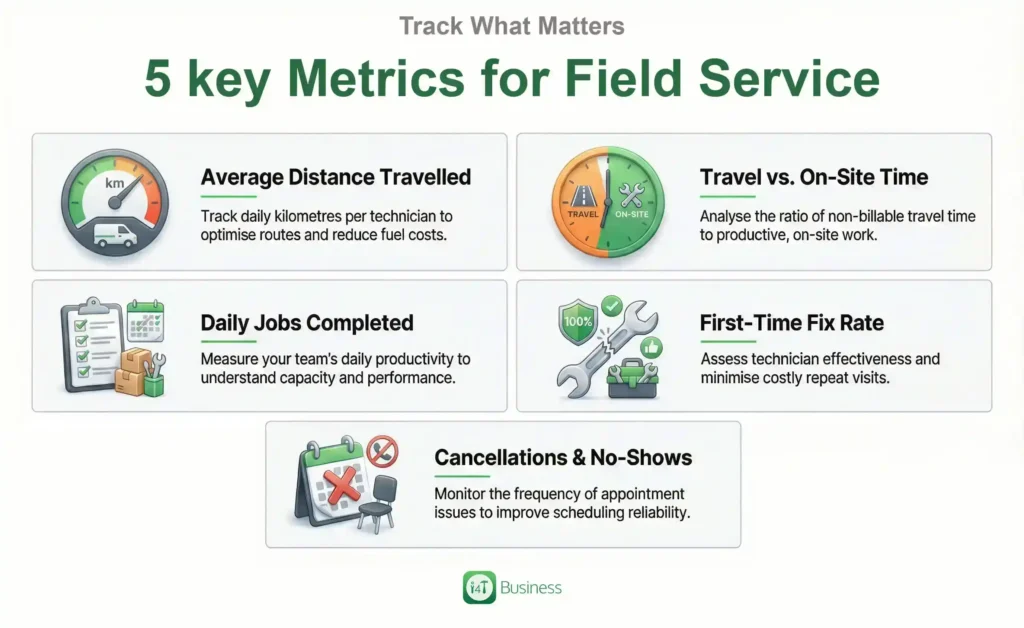
A good job management system will help you track things like:
- Average kilometres travelled per tech per day
- Travel time versus time on-site
- Number of jobs completed per day
- First-time fix rate
- Frequency of no-shows or cancellations
Once you can see these numbers clearly, you can start making informed decisions. You might discover that one region needs its own dedicated run day, or that certain job types always take longer than you expect and need bigger time slots.
Building Realistic Buffers
Another part of the puzzle is being honest about how long things actually take. If you book techs back-to-back with no buffer, one delay early in the day can knock the rest of the schedule out of shape. That usually leads to rushed jobs, more mistakes, and, ironically, more travel.
Deliberately building small buffers into your schedule, especially around tricky jobs or peak traffic times, gives you breathing room. When a job goes smoothly, you can use that buffer to handle a small nearby job or catch up on admin. When a job runs long, it doesn’t wreck the whole run.
Continuous Improvement with i4T Business
The real power of smart scheduling for field service comes from the ability to refine your approach over time. With i4T Business, you’re not just planning today; you’re learning from every week and month.
You can test new zoning rules, tweak route planning, adjust default time slots and see the impact in your reports. That’s how you turn “we’re always in the ute” into “we’re comfortably hitting our targets and still getting home on time.”
Make Dispatch Easy with i4T Business
Travel time will always be part of running a field service business, but it doesn’t have to quietly eat your profits or stress out your team.
If you’re ready to put these ideas into practice, i4T Business Job Management Software is built specifically for tradies who want smarter dispatch, less travel, and more control.
With i4T Business you can:
- See jobs and techs on a live map
- Dispatch based on skills, location and availability
- Automate reminders and ETAs for customers
- Give your techs a powerful mobile app to run their day
- Track the KPIs that actually matter for time and profit
Book a demo of i4T Business today and see exactly how much travel time you can cut, and how many more jobs you can fit into the week, by making dispatch truly simple.
FAQs
Start by grouping jobs by area instead of booking them randomly. Even basic zoning by suburb can cut a lot of unnecessary driving.
You can make some improvements without it, but real-time GPS and live maps make smart dispatch much easier and more accurate.
It shows you who’s closest, available and qualified in real time, so you can handle urgent jobs without blowing up the entire schedule.
Most techs adjust quickly once they see it means less paperwork, fewer office trips and clearer job details on-site.
Yes. Whether you’ve got three techs or thirty, i4T Business helps you use smart scheduling for field service so you can save travel time and grow without chaos.
Hot off the press!