
Paperwork is one of those things you never signed up for when you first picked up the tools. Yet somehow, it ends up stealing your evenings, cluttering your ute, and slowing down every part of your trade business.
Let’s walk through how paperwork is really hurting your business, and how modern job management software for tradies can quietly take it off your plate.
The Paper Pile That’s Choking Your Trade Business
If you’re like most tradies, your “system” has grown over time: a paper diary, a whiteboard in the office, job cards in the ute, sticky notes on the dashboard, and invoices sitting half-finished in a notebook. It worked when you had a handful of jobs a week. But as the business grows, this patchwork set-up turns into a bottleneck.
Paperwork doesn’t just look messy. It costs you time hunting for job details, money on under-quoted jobs and sleep, stressing over missed calls and unhappy customers
The more your business grows, the more obvious the cracks become. Jobs slip through, calls don’t get returned, and the admin pile grows taller than your ladder. The big question becomes: “How to get rid of paperwork in my trade business without losing control?”
That’s where digital job management software for tradies comes in. Instead of pushing harder and staying up later, you can change how work flows through your business, from first call to final payment, with far less paper and far more control.
Turn Every Call or Enquiry Into a Digital Job Card
For many trade businesses, jobs still start on the back of an envelope. A customer calls, you jot down their name and address somewhere “safe” and hope you’ll remember where you put it later. That might work for one or two jobs, but once you have multiple calls, emails and messages coming in each day, this is where the wheels start to fall off.
A better way is to make sure every enquiry instantly becomes a digital job card. As soon as someone calls, emails, or submits a form, you log the details into your job management system. From that point on, all the information lives in one place, not scattered across scraps of paper.
You capture contact details, site address, job type, notes, and any photos right up front. That job card then flows through your whole process: scheduling, dispatch, completion, invoicing and reporting. No more re-writing the same details multiple times or losing customer info in the shuffle.
This simple shift alone can dramatically reduce errors, missed jobs and admin time.
What this looks like in practice:
- Log all calls and web enquiries straight into the software
- Store customer and property details in one central database
- Add notes, photos and documents from the very first touch
- Cut down on lost jobs, duplicate bookings and missed follow-ups
Smart Scheduling & Dispatch
Paper diaries and whiteboards are fine until you have a few techs on the road and a couple of emergencies thrown into the mix. Then the constant scribbling, crossing out, re-writing and ringing around starts to chew through your time and patience.
With smart, digital scheduling, you can see all your jobs and all your techs on one shared calendar. Drag-and-drop makes reshuffling quick, and everyone sees the updates in real time. Instead of printing run sheets or texting job details one by one, the system pushes new jobs and changes straight to the tradie’s phone.
Because you can filter by skill, location and availability, you’re sending the right person to the right job at the right time – without relying on guesswork or memory. That not only reduces paperwork, it cuts travel time and improves response times too.
Scheduling improvements you’ll see:
- One central calendar for all bookings and technicians
- Live updates to the field via the mobile app instead of paper run sheets
- Jobs assigned based on availability, skills and location
- Faster reshuffling when a customer cancels or an emergency job comes in
Quote and Invoice On the Spot
Handwritten quote books and manual invoicing create a massive admin backlog. You quote on site, promise to “send it tonight”, get home exhausted, and the paperwork gets pushed to the next night… and the next. By the time the invoice finally goes out, the customer has cooled off or forgotten, and your cash flow cops it.
With the best app for managing jobs and invoices, your tradies can build quotes and invoices on site, using preset item lists and pricing. Once the job is done, all the labour and materials are already in the system; it’s just a matter of reviewing and sending.
Customers receive a professional quote or invoice by email or SMS within minutes. They can approve or query while you’re still top of mind, which means more accepted quotes and faster payments. Less paper, less delay, more money in the bank.
Quoting and invoicing benefits:
- Use standard item libraries and templates instead of writing from scratch
- Create and send quotes and invoices on the spot
- Capture digital approvals and signatures for a clear agreement
- Reduce pricing errors and under-quoting caused by rushed manual calculations
Keep Job Notes, Photos and Compliance Docs in One Place
The paperwork doesn’t stop at the job card. There are before-and-after photos, manuals, compliance forms, warranties and safety documents. When these live in different folders, utes, inboxes and phone galleries, things get missed, especially when a customer calls months later asking for proof, or a regulator wants to see documentation.
Digital job management lets you attach everything directly to the job: photos, PDFs, compliance certificates, SWMS, manuals and more. Anyone in the business can open that job and see the full history without digging through filing cabinets or calling the tech.
This is especially valuable for industries where you revisit the same site or asset regularly. Instead of guessing what was done last time, your team can see clear notes, readings and photos from every visit, all without a single paper folder.
What you can centralise:
- Site and asset photos captured directly through the app
- SWMS, safety forms and compliance certificates stored against the job
- Service history for each property or piece of equipment
- Documents ready to send instantly to customers or auditors when needed
Automate Reminders, Follow-Ups and Recurring Jobs
A surprising amount of “paperwork” is really just reminders: post-it notes on the screen, scribbles in the diary, lists on the fridge at home to call clients about scheduled services or overdue invoices.
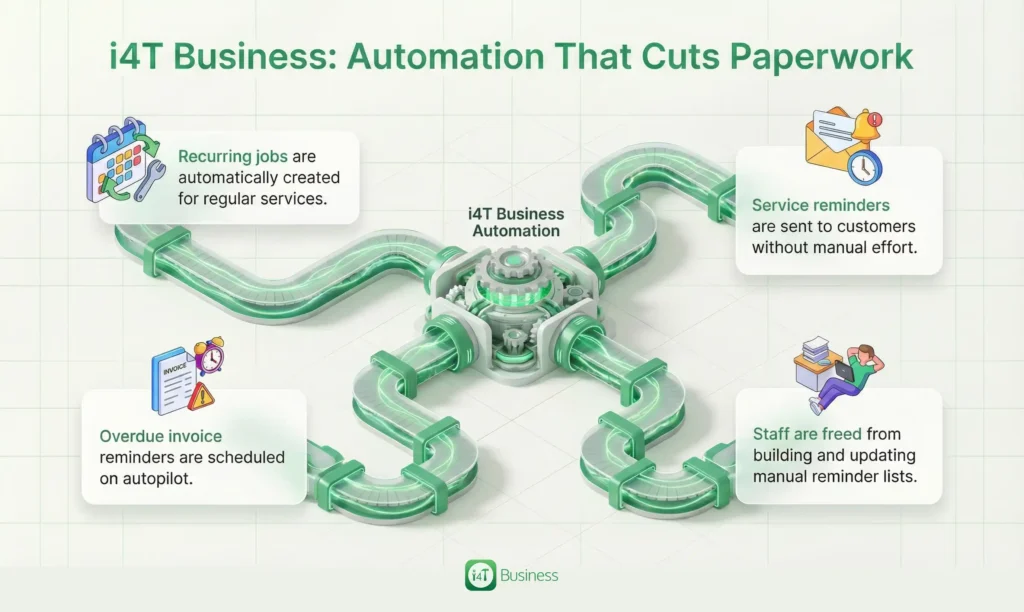
Job management software can automate a huge chunk of this. You can set up recurring jobs for regular clients: annual services, routine inspections, maintenance contracts, so the system automatically recreates the job when it’s due. Customers get reminders ahead of time, and you don’t have to manually track who needs what, when.
The same goes for unpaid invoices. Instead of someone manually chasing every overdue bill with phone calls and hand-typed emails, you can configure polite, branded reminders to go out automatically after a set number of days.
Less manual chasing equals more predictable cash flow and less mental load for you and your team.
Automation that cuts paperwork:
- Recurring jobs are automatically created for regular services
- Service reminders are sent to customers without manual effort
- Overdue invoice reminders are scheduled on autopilot
- Staff freed up from building and updating manual reminder lists
Say Goodbye to Double Data Entry With Accounting & Payments
One of the worst offenders when it comes to paperwork is double (or triple) data entry. You write job details on paper, someone types them into a spreadsheet, and then those same details get re-entered into your accounting software. Every time information is copied, there’s a chance for mistakes.
When your job management software for tradies connects directly to your accounting system, that whole chain becomes much cleaner. Customer details, invoices and payments can sync automatically. The job is created once, and the financials flow straight through, ready for reconciliation and reporting.
This doesn’t just save hours of admin each week. It improves accuracy, reduces disputes, and gives your bookkeeper or accountant cleaner data to work with.
Accounting and payment advantages:
- Push invoices and payments straight into your accounting platform
- Eliminate manual re-typing of customer and job details
- Reconcile faster with fewer mismatches and errors
- Get a clearer picture of profit and cash flow in real time
Give Your Team a Mobile Office
Tradies on the road shouldn’t have to carry half the office with them. Clipboards, printed job sheets, timesheets and warranty forms are easy to damage, misplace or forget. And when they come back to the office in a bundle, someone then has to read and re-enter everything.
A mobile job management app turns your team’s phone or tablet into a mobile office. They can see their schedule, open job details, log their time, add materials, take photos, and get customer sign-off, all while they’re still on site.
Because data is captured in real time, there’s no end-of-day backlog of paperwork. The office knows what’s happening on the ground, and the owner gets a clear, up-to-date view of what’s been done and what’s still outstanding.
On-the-road improvements:
- Technicians receive live job details on their devices instead of printed sheets
- Time, materials and notes recorded on site, not back at the office
- Customer approvals captured digitally at completion
- Fewer trips back to the office just to drop off paperwork
Dashboards and Reports Replace Manual Spreadsheets
Many trade business owners run their numbers in a spreadsheet they update whenever they “get a chance”. The problem is, those numbers are always at least a bit out of date, and the manual effort to keep them current eats into your time.
Job management software builds the reporting into your daily workflow. Because jobs, quotes, invoices and payments are all tracked in one system, you can see live dashboards without updating anything manually. It becomes much easier to answer questions like:
- Which services or suburbs are most profitable?
- Which tradies are the most productive or efficient?
- How many quotes are converting into jobs?
- How much money is tied up in unpaid invoices?
Instead of crunching numbers late at night, you can make decisions quickly, based on clear, real-time information.
Reporting without extra admin:
- View real-time work in progress and job status
- Track quotes won vs lost and average job value
- Monitor overdue invoices and upcoming scheduled work
- Identify your most profitable job types, clients or areas
Stop Letting Paperwork Run Your Business
Paperwork might feel like “just part of the job”, but it’s actually one of the biggest handbrakes on your trade business. It slows down scheduling, delays invoicing, hides important information, and keeps you chained to the desk after hours.
If you’ve been wondering “How to get rid of paperwork in my trade business?”, this is your answer: replace your patchwork of notebooks, forms and spreadsheets with a single, connected job management software for tradies.
i4T Business is built specifically for trade and field service businesses in Australia. It brings together job booking, scheduling, field apps, quoting, invoicing and reporting in one platform, making it one of the best apps for managing jobs and invoices if you’re serious about cutting paperwork and growing sustainably.
If you’re ready to stop drowning in forms and start running a smoother, smarter operation, now’s the time to act.
Book a demo or start a trial of i4T Business and see the difference for yourself
Your tools should be in your hands, not your pen. Let i4T Business handle the paperwork so you can get back to doing what you do best: delivering quality work for your customers.
FAQs
It’s a digital tool that helps tradies manage jobs, schedules, quotes, invoices and payments in one place instead of using paper and spreadsheets.
It turns job cards, quotes, invoices and forms into digital records that can be created, stored and shared from your phone or computer
Yes. i4T Business works well for solo tradies and small teams, and can scale as your business grows.
No. The mobile app is simple and user-friendly, so most tradies pick it up quickly with a bit of basic training.
The easiest way is to book a demo or start a trial, run a few real jobs through it, and see how much time and paperwork you save.
Hot off the press!


![What Should My Work Order Include? [Checklist + Download]](https://i4tbusiness.com/au/wp-content/uploads/2026/01/b6-300x157.webp)