

If you run a service business in Australia, you know that tracking every job from quote to payment can be a juggling act. Without a clear, reliable system, it’s easy to lose track of quotes, miss follow-ups, delay invoices, or even overlook payments entirely. That’s where job tracking software really shines, helping you keep everything in one place and ensuring no job falls through the cracks. In this guide, we’ll walk you through how to track every job from quote to payment without missing anything, covering practical steps and the benefits of a solid job tracking system.
Why Jobs Get Missed Between Quote and Payment
In many Australian service businesses, jobs get missed or delayed between the initial quote and final payment due to a range of common issues. For example, a follow-up on a quote might slip through because it’s stuck in an email inbox or forgotten altogether. Once a quote is approved, sometimes the job isn’t promptly scheduled, or updates about extra work aren’t recorded properly. Without clear communication, completed jobs might not get invoiced quickly, and payments may not be matched back to the correct job. These gaps often stem from a broken quote to invoice process where information is scattered and inconsistent.
What Is Job Tracking Software?
Job tracking software is a specialised tool that helps service businesses manage every stage of their work, starting from quoting, through scheduling and job management, all the way to invoicing and payment collection. A good system centralises all job details, staff updates, quotes, invoices, and payment statuses in one place. This makes it easier for office admins, field teams, and business owners to stay up to date and respond quickly to changes or issues. Essentially, it’s a digital dashboard that keeps your service business organised and efficient.
The Quote to Invoice Process Every Service Business Should Follow
To track jobs from quote to payment effectively, you need a clear and well-defined process. It typically looks like this: First, a customer requests a quote, either by phone, email, or online form. Next, you create and send the quote promptly, making sure it includes detailed work scope and pricing. Follow-ups should be scheduled to confirm approval. Once approved, the job is scheduled and assigned to the right staff. Work is carried out and recorded carefully, noting any extras or variations. When the job’s done, an invoice is generated quickly, sent to the customer, and payment tracked until cleared. Finally, the job closes with notes on any follow-up actions. This flowing sequence forms the backbone of a successful quote to invoice process.
How a Job Tracking System Keeps Everyone on the Same Page
A good job tracking system sets clear job stages that all team members can see. For example, statuses like new enquiry, quote sent, approved, scheduled, in progress, waiting on parts, completed, ready to invoice, invoiced, paid, and closed give everyone from your office staff to field technicians clear visibility. This transparency improves communication, makes scheduling easier, and ensures admin follows up on quotes, invoices, and payments without delay. Customers can also benefit by receiving timely updates, reducing confusion and improving satisfaction.
What Details Should Be Tracked on Every Job?
Tracking every job properly means capturing key details at each stage. Essential information includes customer and site details, the exact scope of work, quote amounts, and approval dates. You’ll want to record who’s assigned to the job, scheduled dates, labour and materials used, and any photos or notes from the field. Variations or extra work requests should be documented too. After completion, invoice amounts and payment statuses must be recorded to ensure no outstanding money is missed. Finally, notes about follow-up activities or future work help maintain strong customer relationships.
Why Spreadsheets Stop Working as Your Business Grows
Many small Aussie service businesses start with spreadsheets to track quotes, jobs, and invoices. But as job volume rises, spreadsheets quickly become risky and unmanageable. Manual updates are time-consuming and prone to error. Version confusion occurs when files are shared back and forth. Important follow-ups get missed, especially with no automated reminders. Spreadsheets are not mobile-friendly, so field teams can’t update job progress easily on site. Importantly, spreadsheets lack integration with accounting and payment systems, leaving business owners blind to cash flow and job profitability at a glance.
Features to Look for in Job Tracking Software
When considering service business software, certain features are essential to ensure smooth job tracking. Look for robust quote management that makes creating and sending quotes straightforward. Job scheduling tools should allow easy assignment and calendar views. Mobile apps or portals let field staff update job statuses in real time. The system needs to handle time and material tracking for labour and parts. Seamless conversion of approved quotes into invoices reduces admin repetition. Payment tracking with alerts helps avoid overdue invoices. Customer history and reporting features give insights into business performance. Lastly, integration with popular accounting software completes the cycle efficiently.
How to Set Up a Simple Job Tracking Workflow
To improve your job tracking, start by mapping your current process from quote to payment. Define key job stages relevant to your business, such as enquiry, quoting, approval, scheduling, work in progress, invoicing, and payment. Assign responsibility for each step clearly, whether it’s sales, operations, or admin. Create rules for moving jobs from one stage to the next, and set reminders or alerts for critical follow-ups. Regularly review jobs marked complete but not yet invoiced to avoid revenue leakage. A weekly check on overdue payments prevents money from slipping through unnoticed. With this workflow in place and modern job tracking software supporting it, your business runs smoother.
Common Job Tracking Mistakes to Avoid
Even with the best intentions, some job tracking pitfalls catch out many Australian service businesses. One frequent mistake is tracking quotes separately from jobs, which leads to disconnected records. Relying on memory or informal tools like texts causes missed follow-ups. Using multiple disconnected systems instead of integrated software results in inefficiency and errors. Not recording variations or extra work means unpaid jobs. Failing to update job statuses leaves team members guessing the current stage. Completing work without verifying invoice accuracy causes delays in payment. Lastly, neglecting to follow up unpaid invoices harms cash flow and business health.
Example: Tracking a Job from Quote to Payment
Let’s imagine a small Melbourne landscaping business receiving a quote request to redesign a backyard. They use job tracking software to log the enquiry immediately and create a detailed quote outlining materials, labour, and timelines. The quote is sent the same day and followed up with a polite phone call. Once approved, the job is scheduled, and the field team gets a mobile update with all job details. During the work, technicians log hours and upload photos of progress. After completion, the system auto-generates an invoice based on tracked work with no data lost. The admin team sees payment arrive online and marks the job as closed. This smooth flow prevents missed materials, forgotten invoices, or unpaid work.
How i4T Business Job Management Software Helps
For Australian service businesses looking to level up their job tracking, i4T Business Job Management Software offers a practical solution. It handles every stage from quoting and job scheduling to tracking staff updates, invoicing, payments, and customer info—all in a single platform. With i4T Business, you get real-time visibility over your entire job pipeline, automated reminders, and easy quote-to-invoice conversion. Your team stays connected whether in the field or the office, and you gain clearer business insights to make smarter decisions. This software is built specifically with tradies, contractors, and owner-operators in mind, tailored to help you quote faster, manage jobs more clearly, and invoice sooner.
Final Checklist for Tracking Every Job
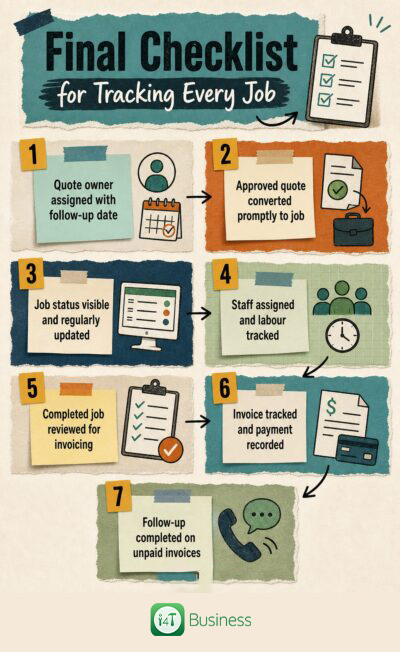
Before we wrap up, here’s a quick checklist to keep your job tracking on point: Make sure every quote has a clear owner and follow-up date. Convert approved quotes into scheduled jobs promptly. Keep visible job statuses updated throughout the process. Assign staff roles clearly and track labour and materials. Review completed jobs for invoicing without delay. Track invoices against payment receipts carefully. Complete follow-ups on any unpaid invoices to maintain cash flow. Following this simple checklist helps you close the loop on every job and avoid missing payments.
- Quote owner assigned with follow-up date
- Approved quote converted promptly to job
- Job status visible and regularly updated
- Staff assigned and labour tracked
- Completed job reviewed for invoicing
- Invoice tracked and payment recorded
- Follow-up completed on unpaid invoices
Conclusion
Tracking every job from quote to payment isn’t just about keeping organised paperwork, it’s about maintaining a clear, repeatable process that everyone on your team understands and follows. Using consistent job statuses ensures no stage is overlooked, while investing in the right job tracking software transforms how smoothly your service business operates. With i4T Business Job Management Software, Aussie tradies, contractors, and service providers can quote faster, manage jobs with transparency, invoice promptly, and keep their business on track for success.
Frequently Asked Questions
Using integrated job tracking software with a clear process for quotes, scheduling, invoicing, and payment follow-up is the most effective method.
It manages quotes, job scheduling, updates, invoicing, payments, and reporting in one central system to keep service businesses organised.
By defining clear job stages, assigning responsibilities, using reminders, and adopting software that automates quote approval to invoice generation.
While possible for very small volumes, spreadsheets become inefficient and risky as your business grows and job complexity increases.
It should handle quote creation, scheduling, mobile job updates, time and material tracking, invoicing, payment monitoring, and reporting.
It streamlines communication, reduces errors, improves visibility, automates admin tasks, and helps manage increased job volume effectively.