

//
Share this article

Table of Contents

How to Manage Emergency and Planned Maintenance in One Calendar

How to Manage Emergency and Planned Maintenance in One Calendar

Table of Contents

Key Takeaways

  • Maintenance scheduling software helps manage both emergency and planned maintenance effectively.

  • Prioritising tasks and using a unified calendar enhances productivity and reduces stress.

  • Real-time updates and GPS integration minimise travel time and improve customer satisfaction.

Key Answer

Use maintenance scheduling software to efficiently manage emergency call-outs and planned maintenance in one calendar by prioritising tasks, creating recurring schedules, and improving real-time communication.

In the bustling world of field service management, juggling emergency call-outs alongside planned maintenance can often feel like a high-wire act. For Aussie tradies, ensuring that both are efficiently managed on a single calendar is crucial. This is where maintenance scheduling software comes into play, offering a seamless integration of emergency and routine tasks, ultimately boosting productivity and customer satisfaction.

Let’s dive into how you can streamline these processes and why having a unified calendar is a game-changer.

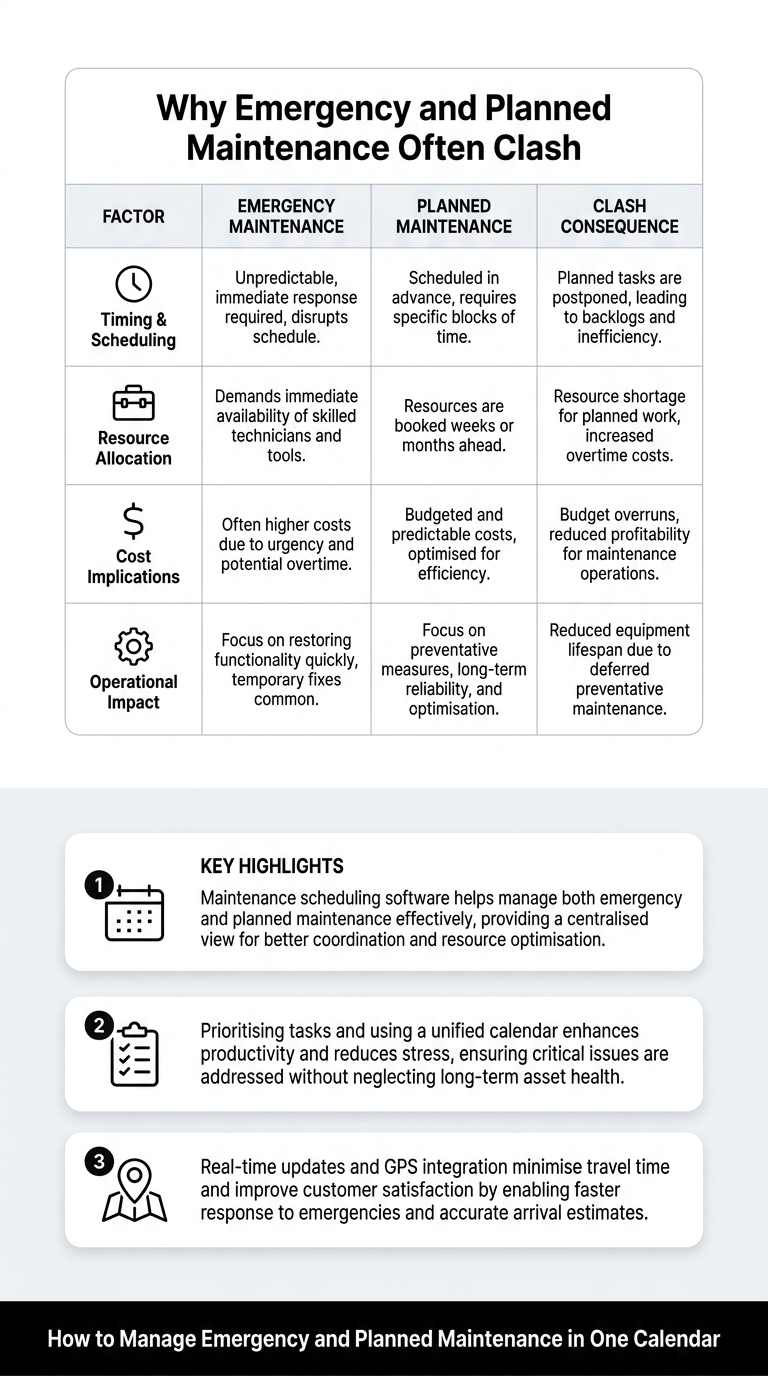
Why Emergency and Planned Maintenance Often Clash

Handling both emergency call-outs and planned maintenance on a single platform presents unique challenges. Emergencies, by nature, demand immediate attention, often disrupting carefully laid-out schedules. This can lead to unanticipated overtime, increased costs, and rescheduling of planned work, impacting customer satisfaction.

Tradies often face the dilemma of deciding which task to prioritise. Improper management of these tasks can also strain resources, making it crucial to have a system that supports quick decision-making and resource allocation.

Implementing strategies like the ’80/20 Scheduling Rule’ – allocating 80% of your schedule to planned tasks and reserving 20% for emergencies – can help maintain balance. This approach ensures that emergencies are handled swiftly while keeping planned activities on track.
infographic_GUxioLS3b8.jpg

Prioritising Jobs Without Disrupting Your Schedule

Effective job prioritisation is essential to minimise disruptions when emergencies arise. Maintenance scheduling software enables you to assess and rank tasks based on urgency and importance. By doing so, you can ensure that your most critical jobs are attended to promptly, reducing downtime and enhancing service delivery.

Utilising a ‘Triage Decision Matrix’ can further aid in making informed decisions about which jobs to prioritise. This method categorises tasks by urgency and impact, helping you allocate resources efficiently. With the right tools, your team can quickly pivot when emergencies strike, keeping disruptions to a minimum.

Managing Calendar and Recurring Jobs Efficiently

A well-maintained calendar is the backbone of efficient maintenance management. Scheduling software allows you to set up recurring jobs, ensuring routine maintenance tasks are never overlooked. This feature is particularly useful for services that require regular attention, such as HVAC system checks or plumbing inspections.

By automating these schedules, you not only save time but also ensure consistency in service delivery. Moreover, having all jobs, both planned and recurring, visible in one calendar, helps you anticipate and manage workload effectively, reducing the likelihood of scheduling conflicts.

A systematic approach to recurring jobs is essential for maintaining service standards and prolonging the lifespan of equipment.

Assigning the Right Technician Every Time

Assigning the right technician to the right job is crucial. Maintenance scheduling software comes equipped with tools that match technicians to tasks based on skills, availability, and proximity. This ensures that each job is handled by a professional best suited for the task, enhancing service quality and customer satisfaction.

Using software to automate this process reduces the risk of human error and ensures that technicians are always operating at their best capacity. This not only boosts morale but also leads to faster response times and efficient service delivery.

Having the right person on the job also means fewer callbacks and improved first-time fix rates, directly contributing to increased profitability and customer loyalty.

Reducing Travel Time and Scheduling Gaps

Optimising travel routes and reducing scheduling gaps are critical for boosting efficiency. Maintenance scheduling software can integrate GPS and smart routing features to help you plan the most efficient routes for your technicians. This not only saves time but also reduces fuel costs and minimises the carbon footprint.

Moreover, by strategically scheduling jobs based on location, you can significantly reduce travel time between appointments. This approach ensures that more jobs can be completed within a shift, increasing your team’s productivity and capability to handle emergency call-outs without delay.

Such efficiency improvements are essential for maintaining a competitive edge in the field service industry, especially in expansive areas like regional Australia.

Keeping Customers Updated When Plans Change

Good communication is key to maintaining strong customer relationships, especially when plans need to change. Maintenance scheduling software provides real-time updates and automated notifications to keep customers informed about their appointment status.

Whether it’s a delay due to an emergency call-out or a rescheduling of planned maintenance, timely communication prevents misunderstandings and builds trust. Automated messages and updates ensure that customers are never left in the dark and that their service expectations are effectively managed.

This level of transparency and reliability is what sets top-notch field service providers apart, cementing customer loyalty and paving the way for repeat business.

Tracking the Performance of Your Maintenance Schedule

Tracking and analysing the performance of your maintenance schedule is vital for continuous improvement. Software tools provide insights into key performance indicators (KPIs) like schedule compliance and emergency response times. These metrics help you identify areas for improvement and optimise your scheduling strategies.

Regularly reviewing these KPIs can highlight trends and patterns, enabling you to adjust strategies proactively to enhance efficiency. For instance, monitoring emergency response times can help you tweak your scheduling model to better accommodate unexpected call-outs.

Data-driven insights empower you to make informed decisions, ensuring your business remains agile and responsive to both planned and emergency maintenance needs.

How Maintenance Scheduling Software Simplifies Everything

Maintenance scheduling software is a comprehensive solution that brings everything together, offering real-time visibility into both planned and emergency maintenance activities. This integration is crucial for keeping everyone, from office staff to field technicians, on the same page.

With software like i4T Business, you can streamline operations, reduce administrative tasks, and enhance overall service delivery. The ease of managing all tasks from a single platform means fewer missed appointments and improved customer satisfaction.

By adopting a unified approach to scheduling, you position your business to handle emergencies efficiently while maintaining routine service standards. This dual focus not only boosts productivity but also enhances profitability, ensuring long-term success.

Kick off your free trial of i4T Business today to experience the transformative power of maintenance scheduling software.

Frequently Asked Questions

The 80/20 Scheduling Rule involves dedicating 80% of your schedule to planned maintenance tasks and reserving 20% for unexpected emergencies to ensure flexibility.

It offers real-time updates, automates routine tasks, optimises travel routes, and enables better job prioritisation, enhancing overall productivity and customer service.

Yes, it matches technicians to jobs based on skills, availability, and location, ensuring efficient and timely service delivery.

The software automates scheduling of routine tasks, ensuring they are consistently completed without manual oversight, improving reliability and efficiency.

Good communication keeps customers informed about service changes, building trust and ensuring high satisfaction levels.

Scroll to Top