
//
Share this article

Table of Contents

How to Introduce Job Management Software to a Resistant Field Team

How to Introduce Job Management Software to a Resistant Field Team

Table of Contents

Key Takeaways

  • Understanding and addressing field team resistance is crucial for successful software adoption.

  • Interactive product demonstrations help build confidence and understanding among technicians.

  • Gradual implementation and ongoing training are keys to successful software rollout.

  • Regular feedback and continuous improvement ensure the software remains beneficial and relevant.

Key Answer

To successfully introduce job management software to a resistant field team, address concerns early, involve technicians in the process, demonstrate real-world benefits, and gradually implement changes to ensure team buy-in and successful adoption.

Introducing job management software to a resistant field team can feel like an uphill battle. However, it’s crucial for streamlining operations, improving communication, and making technicians’ jobs easier. This guide will walk you through understanding resistance, demonstrating software effectively, and ensuring smooth adoption for your Australian trade business.

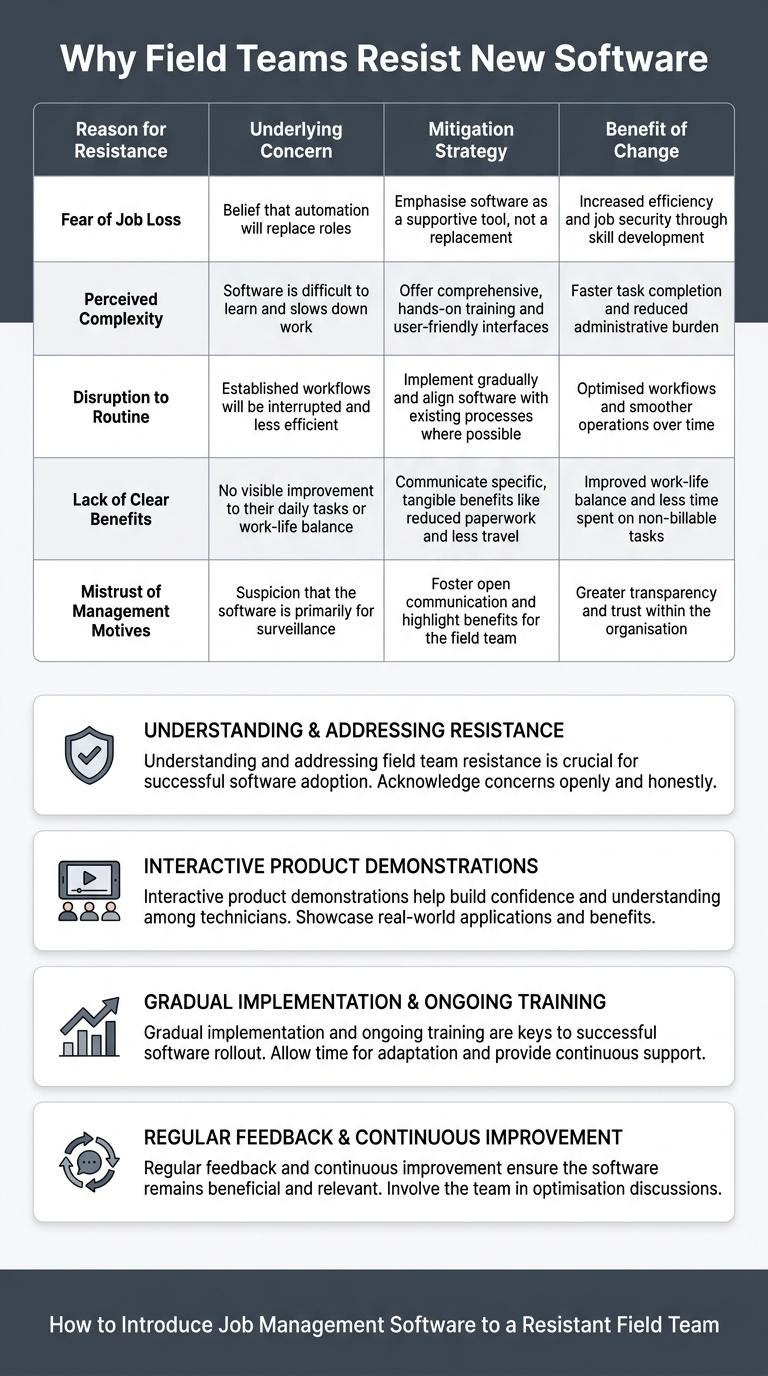
Why Field Teams Resist New Software

Field teams often resist new software due to fears of increased surveillance, a steep learning curve, or potential disruptions to their workflow. These concerns are understandable and must be addressed head-on to facilitate a successful transition.

Fear of being monitored is a common concern. Many technicians feel that job management software could lead to micromanagement, as managers now have the tools to track their every move. It’s essential to clarify that the aim is not to monitor individual performance excessively, but to improve overall efficiency.

Another reason is the learning curve associated with new technology. Not every team member will be tech-savvy, and the thought of mastering a new system can be intimidating. Providing assurance that support and training will be readily available is key.

Finally, there’s the worry that new software will disrupt existing workflows. Many tradies have honed their methods over years, and the idea of changing them can be daunting. Reassuring your team that the software will be implemented gradually can help ease these fears.
infographic_TF0tELUTd8.jpg

Understanding Your Team's Concerns

Start by having open conversations with your team about their worries. Listen actively and empathise with their concerns. It’s important to explain how job management software can reduce their workload and not add to it.

Emphasise that the software is designed to handle administrative tasks, reduce paperwork, and allow more focus on the job at hand. In Australia, where efficiency is key due to the size of projects and travel involved, this can be a significant selling point.

By demonstrating empathy and understanding, you create a foundation of trust which is crucial for the next stages of implementation. Addressing these concerns with transparency will show your team that their input is valued and respected.

Using a Product Demonstration to Build Confidence

A practical product demonstration can make a world of difference. Show your team exactly how the software works and how it will benefit their daily tasks. Use real-world scenarios they encounter regularly to highlight the software’s advantages.

Ensure that the demonstration is interactive. Allow your team to ask questions and try out the software themselves under your guidance. This hands-on experience can help demystify the software and dispel initial apprehensions.

Emphasising features like automated scheduling and instant communication can clearly illustrate how the software will make their jobs easier. Demonstrations should be engaging and directly related to their everyday challenges.

Starting with Simple Everyday Tasks

Begin by integrating the software into simple, everyday tasks. This approach allows your team to get comfortable with the system without overwhelming them.

Start with tasks such as scheduling or basic reporting, which are likely already part of their routine, but can be significantly improved with the software. This gradual approach helps in building familiarity and confidence.

By easing your team into the software with these tasks, you create a positive experience early on, which can foster a more receptive attitude towards broader implementation. It’s about showing them that the software is a tool for empowerment, not a burden.

Rolling Out the Software Gradually

A phased rollout is critical for successful implementation. Start with a pilot program in a small team or for a specific type of task. Gather feedback and make necessary adjustments before a full-scale launch.

This method allows you to test the software’s effectiveness and iron out any issues without disrupting your entire operation. It also gives your team time to adjust and provide input, making them feel like a valued part of the process.

Gradual implementation ensures that any teething problems are resolved early on. It also helps build momentum as team members see their peers benefit from the software.

Training Your Team for Long-Term Success

Investing in comprehensive training is essential. Offer sessions that cater to all levels of expertise within your team, from beginners to advanced users.

Provide resources like step-by-step guides, video tutorials, and one-on-one training sessions. Ensuring that your team is comfortable with the software will improve both confidence and adoption rates.

Continuous training opportunities, such as quarterly refresher courses or regular Q&A sessions, help maintain proficiency and encourage a culture of learning.

Measuring Adoption and Improving the Process

Once the software is in place, measure its impact through key performance indicators (KPIs). Look at metrics such as time saved, error reduction, and improved communication to assess success.

Regularly seek feedback from your team to identify any remaining issues or potential improvements. This feedback loop not only helps refine processes but also shows your commitment to creating a supportive work environment.

Continuous improvement is key to maintaining momentum and ensuring long-term success with the new system. Be open to changes and ready to adapt based on feedback.

Common Mistakes When Implementing Job Management Software

Avoiding common pitfalls can make a significant difference in your success. One mistake is rushing the process. Hasty rollouts can lead to errors and frustration.

Another common error is failing to involve your team in the decision-making process. Not considering their feedback can result in a system that doesn’t meet their needs, leading to poor adoption.

Lastly, neglecting training can severely hamper implementation. Without adequate preparation, your team might struggle to use the software effectively, which can result in resistance and resentment.

i4T Business can hand-hold your team during product demonstration, through the implementation stage.

Book a demo today.

Frequently Asked Questions

To ensure adoption, involve your team early in the process, provide thorough training, address their concerns, and demonstrate the software’s tangible benefits.

Common mistakes include rushing the rollout, not considering team feedback, and neglecting adequate training.

Gradual implementation allows your team to adapt slowly, making it easier to integrate the software into daily tasks without overwhelming them.

Job management software reduces paperwork, improves communication, and streamlines workflows, making technicians’ jobs easier and more efficient.

Feedback is crucial as it helps identify issues, improve processes, and demonstrates that team input is valued, encouraging buy-in.

Scroll to Top