

Running a trade business in Australia is no easy feat. Most tradies and field service operators find themselves juggling multiple roles: answering phone calls, chasing quotes, booking jobs, managing staff, and handling invoicing. Add to that the constant pressure of cash flow concerns, missed appointments, and slow admin processes, and it’s easy to feel overwhelmed. But what if a chunk of your routine work could be taken care of automatically? Automation isn’t about replacing the hard yards or human touch that make your business unique; it’s about removing repetitive, manual tasks that eat up your time and slow you down.
Thanks to advances in field service management software and job management tools, many everyday tasks in a trade business can now be fully automated. This can help tradies save hours each week, reduce errors, get paid faster, and improve overall efficiency. In this guide, we’re breaking down the 11 tasks you can automate fully in your trade business today, showing how they work and why these automations fit perfectly into the daily life of any Aussie tradie.
What Fully Automating a Task Actually Means in a Trades Business
When we talk about automation, there’s a spectrum to understand. On one side, you have manual processes: every step done by hand, maybe scribbled notes or juggling separate spreadsheets and emails. Then there are partly automated workflows, where software helps but still needs you or your team to initiate or remember the next step. Fully automated tasks are different. They mean once you set up the process, the system independently triggers each step without needing your input. For example, a job gets booked, and the system instantly sends confirmation to all parties without anyone pushing ‘send.’
In a trades business, full automation means less dropped balls and faster responses. It creates a seamless flow from when a customer first enquires to job completion and payment, reducing reliance on memory, manual follow-ups or multiple tools. The right FSM automation features enable this, making sure your field and office teams stay in sync without constant back-and-forth.
Why Tradies Should Automate Repetitive Admin First
Repetitive admin tasks are the prime candidates for automation in trades businesses because they take up time but add little value. Think data entry, chasing unpaid invoices, or sending routine appointment reminders, these all eat into your day and soak up resources that could be better spent on job sites or customer care.
Automating these dull but necessary chores immediately saves hours, cuts down on human errors, and maintains consistent communication with customers. It also frees up your team from tedious admin work, so they can focus on high-impact tasks. Crucially, it improves customer experience; timely reminders minimise no-shows, swift invoicing boosts cash flow, and automated follow-ups keep your business front of mind without sounding pushy.
For busy tradies looking to strike a better work-life balance, tradie admin automation delivers clear wins that quickly pay back setup time and help scale operations smoothly.
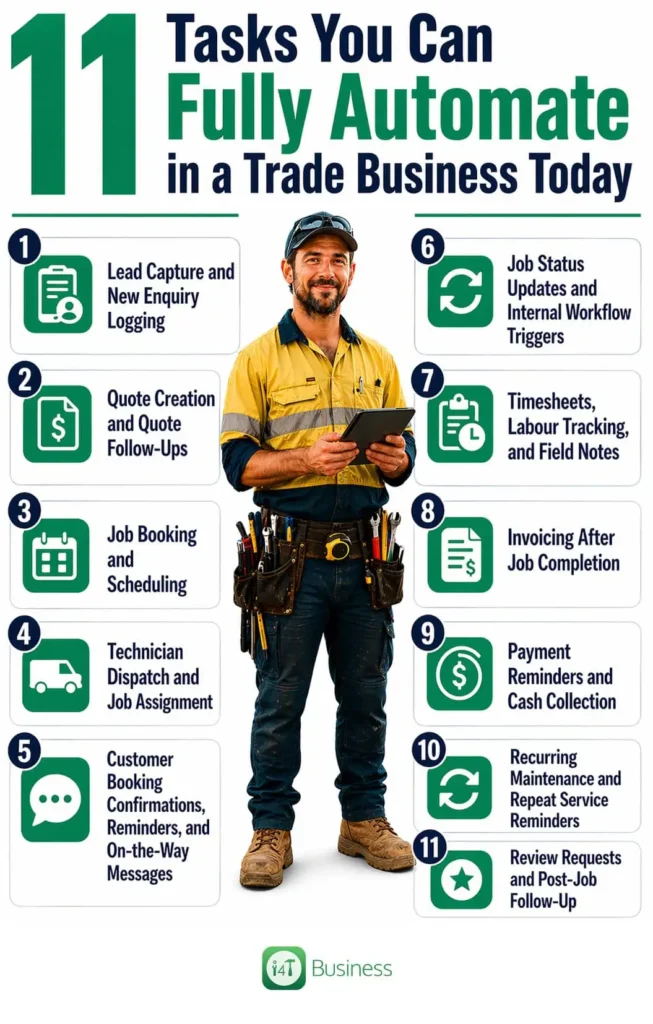
1. Lead Capture and New Enquiry Logging
One of the biggest leaks in revenue for trade businesses is missed enquiries. Whether it’s a phone call, website form submission, social media message, or an online booking attempt, if these leads aren’t captured and logged quickly, they can easily slip through the cracks. Automation in trade business starts right here.
Modern field service management software can automatically pull new enquiries into a central system the moment they happen. By integrating your website forms, Facebook messages, or even mobile calls, new leads are recorded instantly without manual entry. This not only stops lost jobs but streamlines follow-ups by alerting you or your sales team immediately. For example, a plumber receiving a website enquiry at 7 pm can have that info logged and a prompt follow-up set automatically for the next morning.
This automated lead capture means fewer calls go unanswered and there’s a clear audit trail for every customer contact.
2. Quote Creation and Quote Follow-Ups
Creating quotes manually can be tedious and slow you down, often resulting in lost jobs when potential customers don’t hear back promptly, or quotes get delayed. Using pre-set templates and price lists within job management software helps tradies speed up quote creation. Automation can prefill materials, labour rates, or markups based on the job type or client history, meaning you can send accurate quotes in minutes rather than hours.
Yet, it’s not just about creating quotes quickly; it’s about chasing them up. Automated reminders that nudge customers to approve quotes or request changes keep sales moving without you having to manually chase each one. This workflow automation for tradies ensures more jobs progress from enquiry to booking with less effort, improving conversion rates.
For example, an electrician sending quotes for switchboard upgrades can have the system automatically follow up three days after the initial quote was sent if no response is received.
3. Job Booking and Scheduling
Once a quote is accepted, a job needs booking and scheduling, an area where many tradies face bottlenecks. Manually coordinating calendars, managing job priorities, and juggling technician availability can quickly become confusing and time-consuming.
Automated scheduling for tradies can step in here, turning approved quotes or new enquiries directly into scheduled jobs within your FSM or job management software. The system can assign dates, times, and resources based on real-time availability, helping avoid double bookings and back-to-back jobs that stretch your team too thin.
This reduces the admin headache and minimises the chance of communication slip-ups between office and field. Trade business automation examples show that smart scheduling can cut no-shows and improve on-time arrival rates, key factors in customer satisfaction.
4. Technician Dispatch and Job Assignment
Assigning the right technician to the right job is critical for quality service and efficiency. With automation, jobs can be allocated automatically based on criteria such as technician location, skill level, job urgency, or type. This ensures tasks get to people best suited to complete them without managers needing to oversee every detail all the time.
For instance, a HVAC business could use this feature to send urgent repairs to the closest qualified technician, while routine maintenance jobs get slotted into less busy schedules. This not only speeds up response times but also optimises routing and reduces fuel costs.
By using FSM automation features that support intelligent dispatch, tradies can keep field teams productive and customers happier with timely service delivery.
5. Customer Booking Confirmations, Reminders, and On-the-Way Messages
Nothing frustrates customers more than unclear job statuses or last-minute no-shows. Automated SMS and email notifications ease this tension by keeping customers informed throughout the job process. As soon as the booking is confirmed, an automatic message reassures the client. In the lead-up to the job, reminders prompt customers to prepare or adjust plans if needed.
Even messages sent when a technician is on their way add a layer of convenience and transparency. These automated communications reduce the need for your office team to constantly chase customers, freeing them for other work.
When your customers feel well informed, they’re less likely to miss appointments and more likely to be satisfied with your service.
6. Job Status Updates and Internal Workflow Triggers
Behind the scenes, trade businesses juggle complex workflows to move jobs through different stages, from booked, assigned, and in progress to awaiting parts, completed, and invoiced. Automating job status updates means everyone stays on the same page without meetings or manual checks.
Workflow triggers can alert team members when action is required – for example, prompting purchase orders when parts are needed, or sending an internal notification to admin staff once a job is completed and ready to invoice.
This kind of automation reduces confusion and delays, making your operations transparent and easier to manage, especially as your team grows.
7. Timesheets, Labour Tracking, and Field Notes
Keeping track of hours worked, labour costs, and job notes from the field can be a major admin challenge, especially if done with paper timesheets or separate apps. Mobile apps integrated with job management software allow technicians to log their time and notes directly on site using phones or tablets.
This automation of timesheets and labour tracking improves payroll accuracy and simplifies job costing. It also captures vital information such as work performed, delays, or home-owner concerns, details that are often lost or muddled in manual handovers.
For a plumbing business, this might mean logging unexpected extra hours needed when repairing a blocked drain, ensuring the job estimate and invoice reflect the real effort.
8. Invoicing After Job Completion
Getting paid promptly is the lifeblood of any trade business, and invoicing is a critical step. Automated invoicing means once a job is marked as complete, your software automatically generates and sends an invoice based on the job details and quoted price. This cuts out admin hours spent typing bills and chasing paperwork.
It also improves cash flow by reducing delays between finishing a job and receiving payment. Automated invoices can include payment links to make it easier for customers to settle invoices quickly.
For example, after completing an electrical installation, the invoice can be automatically emailed within minutes, helping to keep your bank account healthy.
9. Payment Reminders and Cash Collection
Late payments create cash flow headaches that can impact your ability to buy materials and pay staff on time. Automation in trade business extends to payment reminders, where the system will automatically send polite reminders before and after due dates. It can also confirm receipt of payments once made.
This process works quietly in the background, reducing the need for awkward chasing calls or emails and helping maintain good relationships with clients.
For smaller businesses, automated payment reminders are a straightforward way to professionalise cash collection and reduce the strain of debt recovery.
10. Recurring Maintenance and Repeat Service Reminders
Many trades rely on repeat business through scheduled maintenance or inspections, such as air-conditioning servicing, smoke alarm testing, or gutter cleaning. Automating service reminders ensures your customers get timely prompts when it’s time to rebook.
Field service management software can automatically generate recurring jobs and send reminder emails or texts based on predefined schedules. This not only helps tradies stabilise revenue with repeat work but also builds trust by showing you care about their ongoing needs.
For building maintenance companies, this might mean an automated annual inspection reminder sent well ahead of due dates, making it easy for customers to book.
11. Review Requests and Post-Job Follow-Up
Customer feedback and reviews are gold in today’s competitive market. Automating post-job follow-ups allows your business to send thank-you messages and requests for reviews right after the work is done. These messages can include links directing customers to Google, Facebook, or your chosen review platform.
Automated follow-ups also provide opportunities to check in and offer additional services or support, helping nurture long-term relationships.
For example, a builder might send a review request a couple of days after handing over a completed project, encouraging positive testimonials and referrals.
Which Tasks Should a Trade Business Automate First?
For tradies just starting with automation, it’s best to focus on tasks that save time straight away and reduce revenue leaks. Lead capture, job scheduling, invoicing, and payment reminders tend to offer the fastest returns because they impact cash flow and customer engagement directly.
Once these foundations are automated, you can layer in dispatch automation, status updates, and service reminders as your business and confidence with automation grow.
This step-by-step approach helps tradies avoid overwhelm, making automation practical and manageable.
What FSM Automation Features Should Tradies Look For?
When choosing field service management or job management software, focus on automation features that genuinely reduce admin and improve workflow. These include automated scheduling tools that assign jobs based on real-time availability, recurring job setup for repeat maintenance, customer notification messaging at key points, and workflow triggers that move jobs seamlessly from one stage to the next.
Mobile field updates that let techs log time and notes on site are invaluable for accuracy and speed, while integration with invoicing and payment follow-up tools ensures you get paid without delay.
Look for solutions that bundle these features conveniently so you avoid juggling multiple confusing platforms.
Common Mistakes to Avoid When Automating a Trades Business
Automation can revolutionise your trades business, but only if done right. Common pitfalls include automating poorly designed processes; if your workflow is messy or inconsistent, automating it will just speed up mistakes.
Another mistake is using too many separate tools without integration, which fragments your data and creates new admin headaches.
Overcomplicating workflows with excessive rules or approval steps can also slow things down rather than speed them up. Finally, failing to properly train staff on how to use automation tools leads to frustration and abandonment.
Start simply, review processes, test automation step-by-step, and provide clear training to ensure your automation delivers real benefits.
Why Automation Is Valuable Even for Small Trades Businesses
Some small tradies might think automation is just for large companies with staff to manage or complex operations. The truth is, small and sole-trader businesses often benefit the most from saving admin time and improving reliability.
If you’re a one or two-person operation, automating repetitive tasks like invoicing, payment reminders, or service follow-ups means you get more hours back in your day without hiring extra help.
It also helps maintain professionalism and consistency that can boost customer trust and referrals—even if it’s just you answering the phone and heading out to jobs every day.
With accessible and affordable FSM automation features, tradies of any size can streamline operations and build a foundation for future growth.
Conclusion
Automating business tasks for tradies isn’t about overhauling your entire trade operation overnight. It’s about identifying the admin bottlenecks and repetitive chores that drain your time week in, week out, and starting there. Whether it’s capturing every lead, automating quotes, scheduling jobs, or sending payment reminders, automation can transform how your trade business runs.
By adopting the right FSM automation features and job management software, you’ll see tangible improvements in productivity, cash flow, and customer satisfaction. Automation creates a smoother, more reliable business that frees you up to focus on the work you love while growing your bottom line.
If you’re ready to take the first step, consider how i4T Business Job Management Software can help automate your daily workflows, handle scheduling smartly, streamline quoting and invoicing, and run a more efficient, profitable trade business today.
Frequently Asked Questions
Many tasks like lead capture, quoting, scheduling, technician dispatch, invoicing, payment reminders, and customer follow-ups can be fully automated in a trades business.
Automation speeds up invoicing and payment reminders, reducing delays and helping tradies get paid faster.
No, small and sole-trader businesses often benefit the most from automation by saving admin time and improving consistency.
Look for automated scheduling, recurring job management, customer notifications, mobile field updates, invoicing integration, and payment reminder automation.
Yes, automated scheduling assigns jobs based on real-time availability and priorities, reducing double bookings and confusion.