
TL;DR
The right all-in-one field service software can handle scheduling, payments, and inventory together, as long as it’s genuinely integrated. The biggest win for Australian tradies is having one job record that flows from booking to completion to invoicing, payment, and stock updates without double-handling admin.
- Look for field service management software in Australia, where scheduling, invoicing, payments, and inventory all connect to the same job.
- Payments should update invoice status automatically (paid, part-paid, overdue), not leave you reconciling manually.
- Inventory should be job-linked, so parts used on-site reduce stock levels and help keep quoting accurate.
- Bonus points if it also tracks tools/assets, not just consumables.
If you’re re-entering job details more than once, it’s not truly integrated job management software or FSM software with payments and inventory.
If you’re running a trade business, you’ve probably felt the pain of juggling three separate worlds: scheduling jobs and keeping the week under control, sending invoices and chasing payments, tracking parts, tools, and stock so you’re not caught short mid-job.
That’s exactly where all-in-one field service software comes in. The short answer is yes: the right field service management software in Australia can handle scheduling, payments, and inventory together in one workflow, so you’re not double-entering the same job details across multiple apps.
But not every system is truly “all-in-one”. Some are just a calendar bolted onto invoicing, or an invoice app with a basic booking page. Below are all the answers you need to help you pick an integrated job management software setup that actually makes life easier.
Can field service software manage scheduling, payments, and inventory in one system?
A proper FSM software with payments and inventory links everything back to the job, if it’s genuinely integrated. That means the booking details, job notes, materials used, invoice, and payment status all live in the same place. When you update one part, the rest stays in sync.
In practical terms, it looks like this: You book the job, dispatch the right tradie, add parts used on-site, an invoice is generated from the job, the customer pays, and stock adjusts based on what was used.
When that loop is tight, your admin time drops and your errors drop with it.
What does “all-in-one field service software” include for tradies?
For most Australian tradies, “all-in-one” should cover these basics without needing a spreadsheet on the side:
Scheduling and dispatch
A job calendar, assigning techs, reminders, and easy rescheduling when the day blows out.
Payments and invoicing
Invoices are generated from job details, payment links, receipts, and visibility on what’s paid vs overdue.
Inventory and tools
A pricebook for common materials, tracking what was used on a job, low-stock alerts, and basic tool tracking if you run a team.
If you’re still exporting job lists to invoice or updating stock manually after the job, it’s not really all-in-one.
Is there field service management software in Australia that combines job scheduling and invoicing?
Yes, and it’s one of the biggest wins for tradies because it cuts out repeat admin.
When scheduling and invoicing are linked, you don’t have to retype the customer’s details, site address, job description, or labour hours later on. Instead, the invoice pulls straight from the job record.
It also helps in the real world when someone in the office needs to answer the classic customer call: “Have you got me booked in?” or “Can you resend the invoice?”
With everything connected, it’s a quick check instead of a hunt.
Can FSM software take payments online or on-site after a job is finished?
Yes, and this is where integrated systems really help cash flow.
The goal is simple: make it easy for the customer to pay while the job is fresh in their mind. Depending on how your business operates, that can look like:
- payment links sent by SMS or email with the invoice
- card payment options at completion
- deposits or progress payments for bigger jobs
If your software can’t connect the payment to the invoice and the invoice to the job, you’re back to manual reconciliation and “did they pay?” messages.
Can field service software automatically create invoices and track paid vs unpaid jobs?
The best setups generate invoices directly from job data, so you can itemise labour and materials without rebuilding the job in your invoicing tool. Then you can see, at a glance, which jobs are:
- invoiced but unpaid
- partially paid
- fully paid
- overdue
This matters for compliance, too. If you’re GST-registered, there are specific tax invoice requirements, and if a customer requests a tax invoice, you generally need to provide it within 28 days.
Can integrated job management software track materials used on a job and update stock levels?
As long as the inventory side is more than just a list, this should be possible.
The most useful approach for tradies is job-linked inventory. You add the materials you used while you’re on-site (or when you close the job), and the system deducts them from stock automatically.
This helps you:
- avoid ordering the same parts twice
- reduce “missing stock” arguments
- spot which jobs are chewing through certain materials
- restock before you’re caught short
It also improves quoting, because your pricing and common materials live in one place instead of on someone’s notepad.
Does FSM software with payments and inventory support deposits, progress payments, or part-payments?
Many do, and it’s a must if you run larger jobs.
For example, if you do air con installs, renovations, or commercial work, you might need:
a deposit to lock in the booking, a progress payment at a milestone, then the final payment on completion.
When your FSM software with payments and inventory supports part-payments, it keeps the running total clean and prevents the awkward situation where the invoice says one thing and your bank feed says another.
Can field service software track tools and assets as well as consumable stock?
Tools and consumables behave differently.
Consumables are things you use up on a job (fittings, cable, pipe, adhesive). Tools are assets you want to keep, track, and assign to someone.
A solid system will let you track both, or at least give you a workable way to:
- assign tools to tradies or vehicles
- record tool check-in and check-out
- log photos and notes (handy for lost or damaged items)
If you’ve ever replaced the same “missing” tool twice, you already know why this matters.
How does all-in-one field service software integrate with accounting software in Australia?
Your system should reduce double-handling without creating chaos.
Ideally, your workflow is: job completion, invoice created, payment recorded, and accounting updated
Even if your accounting software is where you finalise BAS and reporting, your field service system should be the operational hub that feeds it clean data. That way:
- invoices don’t get duplicated
- payments don’t get missed
- job notes and proof of work stay attached to the job
The less you copy and paste between systems, the fewer mistakes you end up fixing at the end of the month.
What should I look for when choosing field service software that handles scheduling, payments, and inventory together?
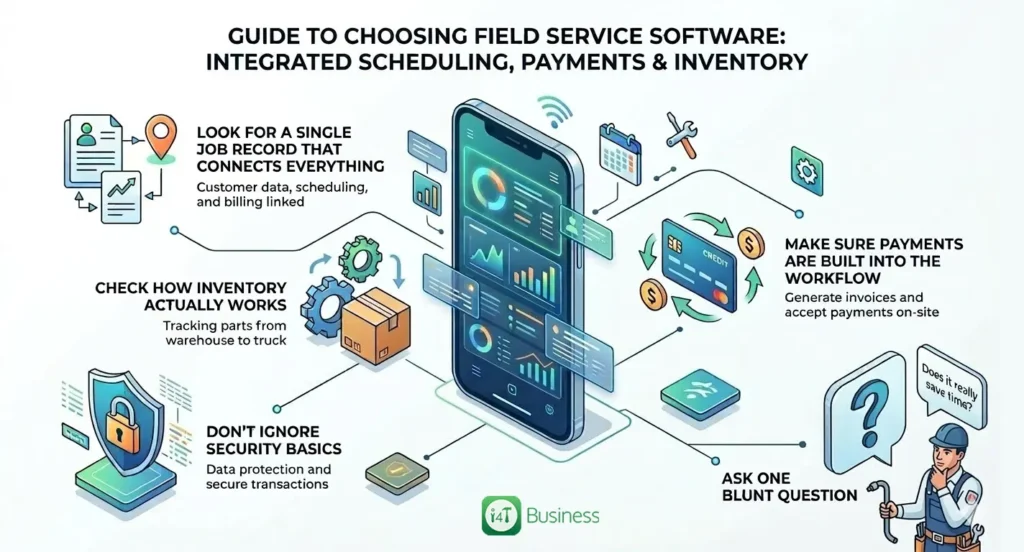
Here’s a practical way to sanity-check whether it’s truly integrated.
Look for a single job record that connects everything
If scheduling, invoice, payment, and inventory all attach to the same job without re-entering details, you’re on the right track.
Check how inventory actually works
You want job-linked stock usage, a pricebook, and stock levels that stay accurate enough to trust.
Make sure payments are built into the workflow
Not just you are not just taking payments, but payments update the invoice status automatically.
Don’t ignore security basics
You’ll be storing customer info, job notes, and payment data, so basics like multi-factor authentication, software updates, and backups matter. The ACSC’s small business guidance highlights MFA, updating software, and backing up information as key starting points.
Ask one blunt question
“If I book a job, finish it, invoice it, get paid, and use stock, will I ever have to enter the same info twice?” If the answer is yes, it’s not the “all-in-one” you’re hoping for.
With a genuinely integrated FSM software you can do it all
So, can field service software handle scheduling, payments, and inventory together? Yes, and for most tradies, it’s one of the fastest ways to cut admin, tighten cashflow, and stop stock problems from wrecking your day.
The key is choosing all-in-one field service software that behaves like one connected system, not three separate modules pretending to be friends.
If you want to keep it simple, i4T Business is built as field service management software in Australia that brings scheduling, payments, and inventory together, so your jobs flow from booking to completion to payment without the back-and-forth. If your goal is a proper integrated job management software setup, that’s the benchmark: one job record, one workflow, fewer headaches.
Book a demo today!
FAQs
Make it easy on mobile, train them in 15 minutes, and start with daily jobs and job close-out. Set one rule: if it’s not in the app, it’s not done.
Scheduling can be live in a day or two. A proper setup with pricebook, invoices, and inventory usually takes 1–3 weeks, depending on how much you add.
No. Most businesses import active customers only and start fresh on job history. You can always add more later.
Some do. Look for offline capture for recording notes, photos and signatures, that syncs when you’re back online.
Yes. Check it supports separate schedules, permissions, and service areas so jobs don’t get booked across town.
Hot off the press!