

If you’re running a trade business in Australia, there’s a good chance you’re juggling two very different kinds of work: construction projects and ongoing service or maintenance. On paper, they might look similar: jobs, labour, materials, customers, invoices. But in reality, the way these two streams operate couldn’t be more different.
Yet many businesses still try to manage both with the same tools, job setups, forms and processes. And this is where things start falling apart. Schedules blow out. Notes go missing. Clients get frustrated. Office staff get caught playing detective. Tradies say things like, “Mate, why am I filling a project form just to replace a hot-water unit?”
That’s why it’s important to understand this simple truth:
Construction and service are not the same, and your FSM workflows shouldn’t pretend they are.
In this article, we’ll break down why these two sides of your business need their own setup, structure and workflows, especially when it comes to FSM workflows for maintenance. By the end, you’ll know exactly what to separate, what to streamline and how i4T Business can help you run both sides smoothly under one platform.
Let’s jump in.
Projects vs Recurring Work
Before you even think about scheduling, documentation or reporting, you have to get one thing right: understanding the DNA of the work.
Construction work is built around big, one-off projects. They may run for weeks, months or even years. They involve multiple phases, multiple trades, multiple approvals… and sometimes, multiple headaches.
Service and maintenance work, on the other hand, is all about speed, repeatability and accuracy. These are quick jobs, usually done in a single visit, often urgent, and very reliant on good history and solid notes.
Trying to use the same FSM setup for both is like trying to use a sledgehammer to fix a loose cabinet hinge; technically possible, but unnecessary and messy.
| Aspect | Construction | Service |
|---|---|---|
| Type of work | Big, one-off jobs with a clear start and end | Smaller, repeatable jobs, often ongoing |
| Timeframe | Runs over weeks, months or even years | Usually completed in a single visit or short time window |
| Complexity | Multiple phases, trades and approvals | Focused on diagnosing and fixing specific issues |
| Main goal | Deliver a finished build to the agreed plans | Fix problems fast and keep assets running well |
| Paperwork level | Heavy documentation and formal records | Lighter paperwork, more about good notes and history |
| Typical examples | New builds, major fit-outs, renovations | Fault repairs, emergency call-outs, and scheduled services |
Why this matters
If you treat a 3-month construction job and a 30-minute maintenance job the same way, your tradies end up filling unnecessary fields, your office team wastes time sifting through irrelevant info, and your customers get the wrong experience.
FSM workflows for maintenance should be lightweight, fast and focused on repeatable tasks, while construction workflows need structure, detail and solid guarding rails.
Planned Builds vs Fast Response
Scheduling is where the difference between construction and service becomes painfully clear.
You simply cannot manage long-planned project stages using the same method you use to dispatch techs for urgent call-outs. They live in different worlds.
| Aspect | Construction | Service |
|---|---|---|
| Planning style | Planned weeks or months in advance | Planned daily, often reshuffled throughout the day |
| Job duration | Long blocks of work over multiple days or weeks | Short bookings, often 30–90 minutes per job |
| Scheduling focus | Stages, dependencies and milestones | Priority, response times and technician availability |
| Change handling | Changes discussed and approved formally | Changes are made quickly to fit in urgent and same-day jobs |
| Resource allocation | Crews booked for long periods | Individual techs assigned based on skills, location and parts |
| Typical urgency level | Generally lower urgency, more predictable | Often high urgency, especially for breakdowns and emergencies |
Why this matters
If you schedule service work the same way as projects, problems show up fast. You miss urgent jobs, SLAs are breached, customers get annoyed, and your team gets confused about priorities.
And if you schedule construction jobs the same way you allocate service calls, you’ll blow out milestones, bottleneck trades, mix up availability, and create costly delays.
Good FSM software will treat construction and maintenance differently behind the scenes, without forcing you to juggle two platforms. And that’s why FSM tools like i4T Business let you build separate scheduling rules from day one.
Site Files vs Asset History
This is where many businesses accidentally trip themselves up.
Construction work and maintenance work require totally different types of information. Trying to cram them into the same job fields only leads to confusion and poor data.
| Aspect | Construction | Service |
|---|---|---|
| Main data focus | Site, project and contract documentation | Asset-level details and service history |
| Typical records | Plans, drawings, specs, progress photos, SWMS, certifications | Brand, model, serial number, fault codes, past notes |
| Financial documentation | Progress claims, variations, staged payments | Quotes, invoices, warranty claims |
| What techs need onsite | Access to the latest plans, variations and safety docs | Quick view of asset history and previous visit notes |
| Risk if the data is poor | Wrong work done, failed inspections, delays | Misdiagnosis, repeat visits, missed warranty or maintenance opportunities |
| Ideal FSM behaviour | Organises large files and project paperwork cleanly | Surfaces asset info and past work instantly for each job |
For construction tradies, this translates into site safety and meeting time, budget and scope requirements. For service technicians, asset history is gold. When they arrive on site, they need the full picture in seconds, not after digging through massive project-style records.
Why this matters
If the data is wrong or hard to find, technicians take longer to diagnose issues, repeat visits increase, customer satisfaction drops, warranty mistakes happen, and maintenance schedules get messy.
A good FSM system allows you to store different information depending on the job type. FSM workflows for maintenance must make asset history immediately accessible, while construction workflows organise large project files clearly and logically.
Margins vs Response Times
Your dashboards and reports need to match the kind of work you’re running. Otherwise, you’re measuring the wrong things and drawing the wrong conclusions.
Construction and service jobs have totally different performance indicators.
| Aspect | Construction | Service |
|---|---|---|
| Key financial metric | Overall project margin and variation margin | Profit per job, contract profitability |
| Time-based metric | On-time completion against the program and milestones | Response time and resolution time |
| Quality metric | Defect rates, rework levels, compliance with specs | First-time fix rate, repeat visit rate |
| Work pattern | Fewer, larger jobs with higher value | Many smaller jobs are spread across days and weeks |
| Customer success measure | Project delivered on time, on budget and to quality | Fast, reliable fixes and consistent maintenance |
| Reporting needs | Long-term project performance and forecast | Daily and weekly performance of the service team and maintenance contracts |
Why this matters
If all KPIs are lumped together, service teams look like they’re “underperforming”, project teams look “slow”, managers can’t pinpoint where the real issues are, and profitability is blurred.
By separating reports for construction and maintenance, you get clarity; clear performance insights, clearer forecasts and clearer decision-making.
Your FSM setup should take this into account automatically, especially when dealing with FSM workflows for maintenance, where metrics like response time and first-time fix rate are crucial.
Big Clients vs Everyday Call-Outs
The customer journey also changes depending on the type of work.
Construction clients usually expect a more formal approach. They want consistency, documentation and regular updates. Service customers want the opposite. They want everything fast and simple:
| Aspect | Construction | Service |
|---|---|---|
| Type of customer journey | Formal, structured and longer-term | Fast, simple and often repeatable |
| Communication style | Tenders, contracts, progress reports, and site meetings | Quick SMS/email updates, ETAs, job-complete notifications |
| Main customer concern | "Will the project finish on time and on budget?" | "Can you fix this quickly and keep it working?" |
| Decision makers | Builders, project managers, developers, and commercial clients | Homeowners, tenants, facilities managers |
| Required documentation | Detailed reports, handover documents, warranties, and compliance certificates | Simple quotes, invoices, service reports |
| Follow-up expectations | Defects period and occasional follow-up works | Regular maintenance reminders and repeat bookings |
Trying to use construction-style communication for a simple maintenance call-out is overkill. And trying to treat a major construction project like a simple service job is a disaster waiting to happen.
Good FSM software gives each type of client the right experience without extra admin work.
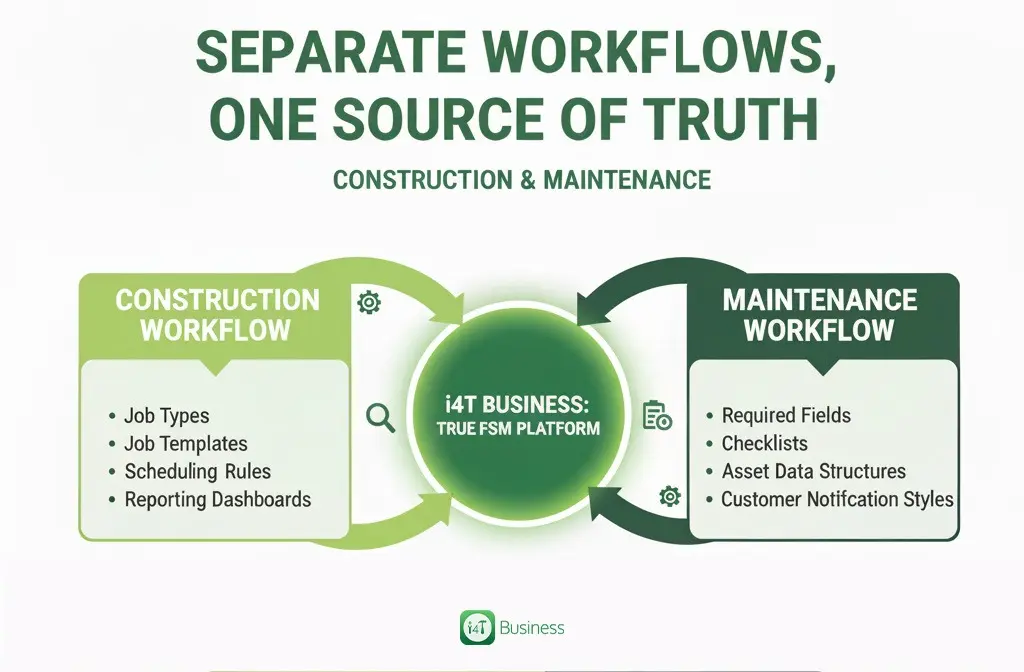
Separate Workflows, One Source of Truth
Here’s the good news: For Construction and Maintenance work, you don’t need two different systems. You only need one system that allows you to configure separate workflows.
That’s the difference between a generic job management tool and a true FSM platform.
A well-designed system like i4T Business helps you customise:
- Job types
- Job templates
- Required fields
- Scheduling rules
- Checklists
- Asset data structures
- Reporting dashboards
- Customer notification styles
This means you can give construction work the depth and structure it needs, and give service work the speed and simplicity it deserves, all without juggling multiple tools.
Benefits of separating your workflows inside one system
When you use one system to run both sides of your business, you experience: less admin,
faster scheduling, better customer experience, stronger reporting and visibility, fewer errors and happier tradies who aren’t drowning in forms.
This is exactly where FSM workflows for maintenance need careful planning. Once set up correctly, your service team becomes faster, more organised and far more reliable.
Split Your Workflows, Not Your Systems.
Construction work and service work don’t operate the same way, so your FSM setup shouldn’t force them into the same box.
By separating construction and maintenance workflows, you give each side of your business what it needs to run smoothly. Your techs get clearer info. Your office team gets cleaner processes. Your customers get better communication. And you get a business that runs with far fewer headaches.
If you’re keen to simplify your operations and set up proper workflows for both construction and service, i4T Business is built exactly for this.
We help tradies across Australia manage projects and maintenance jobs under one roof, with the flexibility to handle each work type differently.
Book a demo, have a chat with our team, and let’s build a setup that truly fits the way your business works.
FAQs
Because they operate completely differently. Construction jobs are long, detailed and heavily documented. Service jobs are quick, repeatable and focused on fast resolution. Using the same workflow leads to confusion, delays and poor data quality.
Maintenance workflows rely heavily on asset history, previous notes, warranty info and clear response times. Technicians need quick, accurate data, without digging through project-style documentation.
Yes, you definitely can, as long as the system allows configurable workflows, different job templates and separate scheduling rules. Tools like i4T Business are built specifically with this flexibility in mind.
Not at all. It actually makes things simpler. Once each job type has the right structure, your team spends less time guessing what’s required. Scheduling becomes easier, and reporting becomes clearer.
i4T Business lets you build custom job types, checklists, scheduling rules, asset records and communication templates for different workflows. That means you can run detailed construction projects and fast maintenance call-outs all from one place, without mixing things up.
Hot off the press!