

TL;DR
In 2026, Australian tradies need field service software that keeps the whole job cycle connected, so nothing gets lost between the office and the tools-on side of the business.
The best field service software in Australia should reduce admin, improve customer communication, tighten scheduling, and help you invoice faster with clean records. Use this as your quick FSM features checklist when comparing any trade business software.
Quick FSM features checklist:
- End-to-end workflow
- Smart scheduling & dispatch
- Customer updates from booking to payment.
- Fast, consistent quoting
- Mobile job app that works on-site
- Invoicing from the job
- Record keeping in one place
- WHS support with simple checklists
- End-to-end customer management
- Inventory & asset tracking
- Simple reporting
- Secure access and data backups
Running a field service business in Australia in 2026 means you’re not just doing great work on-site. You’re also managing bookings, customer expectations, job notes, photos, invoices, staff movements, and a steady stream of messages. The work hasn’t become easier, but the tools available have improved a lot.
That’s why tradies are moving away from scattered systems like texts, notebooks, whiteboards, and spreadsheets, and towards one connected platform. The best field service software in Australia isn’t about being fancy. It’s about being practical: it should save time, reduce mistakes, and help you get paid quicker.
Use this article like an FSM features checklist. If a system covers these essentials well, it’s likely to fit most trade businesses, whether you’re a solo operator, running a small team, or scaling across multiple crews. The goal is simple: better service, better control, and less admin, using modern trade business software.
What should the best field service software in Australia actually do in 2026?
At its core, your software should connect the full journey of a job. Not just one part of it. If you can capture an enquiry but you still have to manually create a quote elsewhere, then retype it into a calendar, then write job notes in a separate app, you’re still losing time and inviting errors.
In 2026, a strong field service system should feel like one continuous workflow. When something changes, it updates everywhere. When the office books a job, the tech sees it instantly. When the tech completes the job, the office can invoice without chasing details. That’s how you cut double-handling, manage jobs better, and keep the whole business moving smoothly.
Which scheduling and dispatch features actually stop gaps, no-shows, and wasted travel?
Scheduling is where most tradie businesses either run like a machine or fall into daily chaos. Jobs blow out. Someone calls in sick. A customer isn’t home. Traffic turns a simple day into a mess. The right scheduling features help you absorb those hits without everything collapsing.
A good automated scheduling system should make it easy to move jobs around quickly and clearly, so both the office and the team know what’s happening in real time. It should also reduce wasted travel by helping you plan your day in a more logical order, especially when you’re juggling urgent call-outs with booked work.
Customer communication is a big part of this too. In 2026, sending appointment confirmations and ETA updates shouldn’t rely on someone remembering to text. When customers know when you’re arriving, you get fewer disruptions, fewer missed appointments, and fewer awkward “we waited all day” complaints.
What quoting features help you win more jobs without underquoting?
Quoting is where profit is either protected or quietly drained. When quotes are rushed, inconsistent, or unclear, you either lose the job or win it and then regret it. A strong quoting setup makes pricing consistent, avoids confusion, and makes it easy for a customer to say yes.
The most useful quoting features in 2026 are the ones that speed you up without lowering quality. That usually means using templates for common job types, including clear inclusions and exclusions, and being able to add photos or notes so the customer understands what they’re paying for. When a quote is easy to understand, it builds trust.
Just as important is what happens after acceptance. If a quote is approved, your system should carry that information straight into scheduling and job planning. You shouldn’t need to rebuild the job from scratch. That’s a common pain point in trade businesses, and it’s one of the easiest ways to lose time.
What invoicing and record-keeping features protect cashflow and keep you organised?
Invoicing delays are one of the most expensive habits in field service. Not because tradies don’t want to invoice, but because the job finishes, everyone moves on, and then the details get messy. Materials get forgotten, time isn’t recorded properly, and the invoice takes longer than it should.
Your software should make invoicing feel like a natural last step of the job, not a separate admin task that happens days later. When job notes, labour time, parts used, and photos are already captured on the job, creating an accurate invoice is faster and easier. That also means fewer disputes, because you can back up what was done.
Record keeping matters too. Government guidance explains that businesses need to keep certain records, and keeping them organised reduces stress at BAS and tax time. A good system helps by storing job history, invoices, and supporting documentation in one place instead of scattered across devices and inboxes.
What should a technician mobile app include for on-site work?
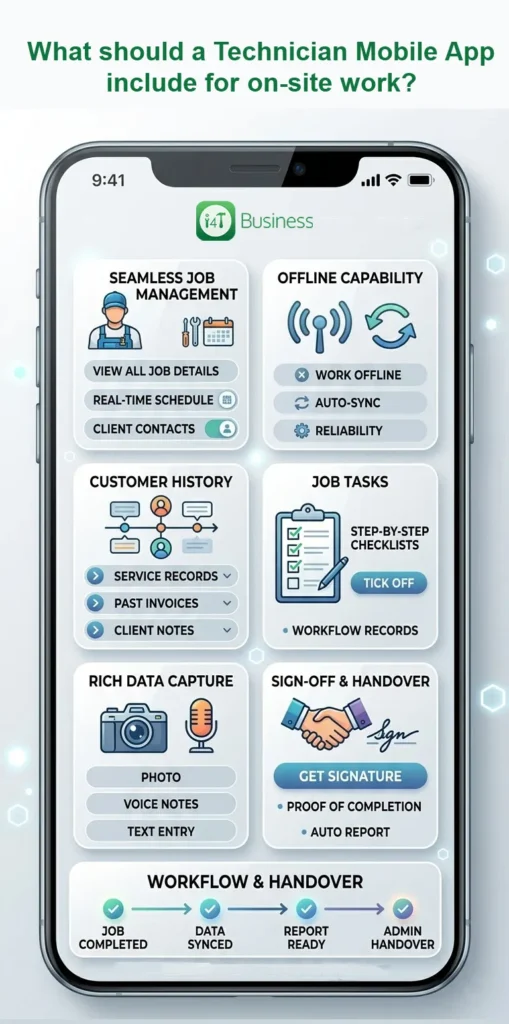
A technician app needs to work in the real world, not just in a demo. In the real world, reception drops out. Jobs run long. Notes are written between tasks. Photos are taken quickly. If an app is slow or clunky, the crew will avoid using it, which means the business loses the benefits.
In 2026, a good mobile app should make on-site admin feel effortless. Techs should be able to view the job details, see customer history, capture photos, record notes, tick off job steps, and finish with proof of completion. If it supports offline mode, even better, because plenty of Australian sites still have patchy coverage.
The big payoff is that once the job is completed, the information is already there. No more chasing the tech for notes. No more trying to remember what was used. No gaps. Just a clean handover.
How can a job management software help with WHS and on-site risk control?
Work health and safety is part of doing business properly, and the paperwork side of it often feels like a burden. But in 2026, software can take a lot of that pressure off, not by replacing safe work practices, but by making them easier to follow consistently and easier to document.
Safe Work Australia provides small business WHS guidance, and the key idea is that businesses have duties to manage health and safety risks.
In practical terms, software should help you build safety steps into the workflow. That might look like a quick pre-start checklist, a way to log hazards and incidents with notes and photos, and access to procedures when the crew needs them. It’s not about creating more admin. It’s about capturing what matters at the right moment, so you’re not scrambling later.
What customer management features stop repeat questions and missed follow-ups?
Customers don’t like repeating themselves. If they’ve used you before, they expect you to remember the basics: what was done last time, what the site is like, and any special notes. When you can see customer history quickly, the service feels smoother and more professional.
Customer service management in 2026 should go beyond a name and phone number. It should give you job history, photos, notes, invoices, and reminders for future work. That’s especially useful for maintenance-style services or clients like property managers and strata, where remembering details saves a lot of time.
Follow-ups matter too. A lot of tradie businesses lose easy revenue not because the work isn’t available, but because someone forgot to call back or send the next quote. A system that helps you track what’s pending and what needs action can lift conversions and improve customer satisfaction, without adding hours to your week.
What inventory and asset tracking features stop tool loss and margin creep?
Tool loss and stock chaos don’t just cost money. They cost time, reputation, and confidence. When a tech can’t find a tool, the job slows down. When parts aren’t tracked properly, invoicing becomes guesswork. When you’re constantly doing emergency supply runs, your labour time gets wasted.
In 2026, field service software should help with better inventory management by letting you understand what’s in each vehicle, what’s assigned to each tech, and what stock is being used on each job. Even simple tracking improves profitability because it stops the quiet leakage that happens when materials aren’t billed or assets go missing.
This is one of those features that feels “optional” until you start using it. Then you wonder how you managed without it.
What reporting should owners actually look at every week?
You don’t need complicated reporting. You need reporting that tells you what’s working and what’s costing you money.
In a field service business, the most useful insights are usually simple. Are enquiries being answered quickly? Are quotes converting? Are jobs being invoiced promptly? Are some job types consistently less profitable than others? Are certain customers always slow to pay?
When reporting is clean and easy to access, you can make decisions faster. It helps you price better, schedule smarter, and focus your marketing and time where it actually pays off.
What security, permissions, and backups should your field service management software have in 2026?
In 2026, cyber risks aren’t just a “big company problem”. Tradies store customer addresses, contact details, invoices, and job history. That data matters. If it’s lost, locked, or exposed, it can hurt the business quickly.
Australia’s cyber.gov.au guidance for small businesses highlights practical steps like strong authentication, updating systems, and having backups.
So your software should support sensible security controls, including user permissions so staff only see what they need, secure logins, and reliable backups. This isn’t the exciting part of software, but it’s one of the most important.
Use this as your FSM features checklist in 2026
If you want a simple way to choose the right platform, don’t start with bells and whistles. Start with the job flow. If the system can handle scheduling, quoting, job notes, customer history, invoicing, tracking, reporting, and security in a way that’s easy for both office and field staff, you’re on the right track.
That’s the real FSM features checklist for 2026. And if you’re comparing options, keep coming back to the practical question: will this reduce admin, reduce mistakes, and help me run a tighter operation?
If you’re ready to bring it all into one place, i4T Business field service software is built for tradies to manage booking, quoting, job tracking, customer records, and invoicing as one connected workflow, so you can spend less time chasing details and more time getting jobs done.
FAQs
It’s software that helps tradies manage jobs from booking and quoting through to job notes, invoicing, and follow-ups.
Scheduling and dispatch, quoting, mobile job cards, customer tracking, fast invoicing, reporting, and strong security.
It lets you invoice straight from the job with time, materials, and photos already recorded, so invoices go out sooner and with fewer mi
Yes. A good mobile app helps techs capture job details on-site, even offline, which reduces admin and improves accuracy.
Use an FSM features checklist and pick the system that covers your daily workflow best, is easy for the team to use, and supports growth without extra admin.
Hot off the press!