
When tradies are on-site, time is money, but it’s all too easy for precious minutes to slip away. Often, job details, photos, notes, quotes, invoices, and customer updates are scattered across phones, paper forms, texts, whiteboards, spreadsheets, and office systems. This jumble means extra calls, repeated trips, and admin headaches that slow down the day.
Mobile apps for tradies are changing the game by putting everything needed right in the palm of your hand. This article will explore six practical ways these apps help tradies work faster on-site, cutting delays and keeping jobs moving smoothly.
Here’s a quick answer upfront: mobile apps help tradies work faster on-site by giving them access to job details, schedules, customer history, forms, photos, quotes, invoices, job status updates, and team communication from their phone or tablet.
1. Tradies can access job details before they arrive
One of the biggest time-wasters for tradies is turning up unprepared. Without the right info like the job address, customer details, site access instructions, or previous work history, tradies often waste time making calls back to the office or scrambling through messages to clarify what’s needed.
Mobile apps for tradies solve this by providing all the job essentials on your device before you hit the site. You can check the customer’s contact info, see notes about special site conditions, review photos from earlier jobs, and confirm required materials — making sure you head there ready to get to work.
This reduces unnecessary phone calls, missed information, and wasted trips. For example, a Melbourne plumber can check if previous pipework was replaced before arriving for a maintenance call, so they bring the right tools and parts the first time.
Having everything to hand means tradies start jobs faster and avoid hiccups that slow down progress.
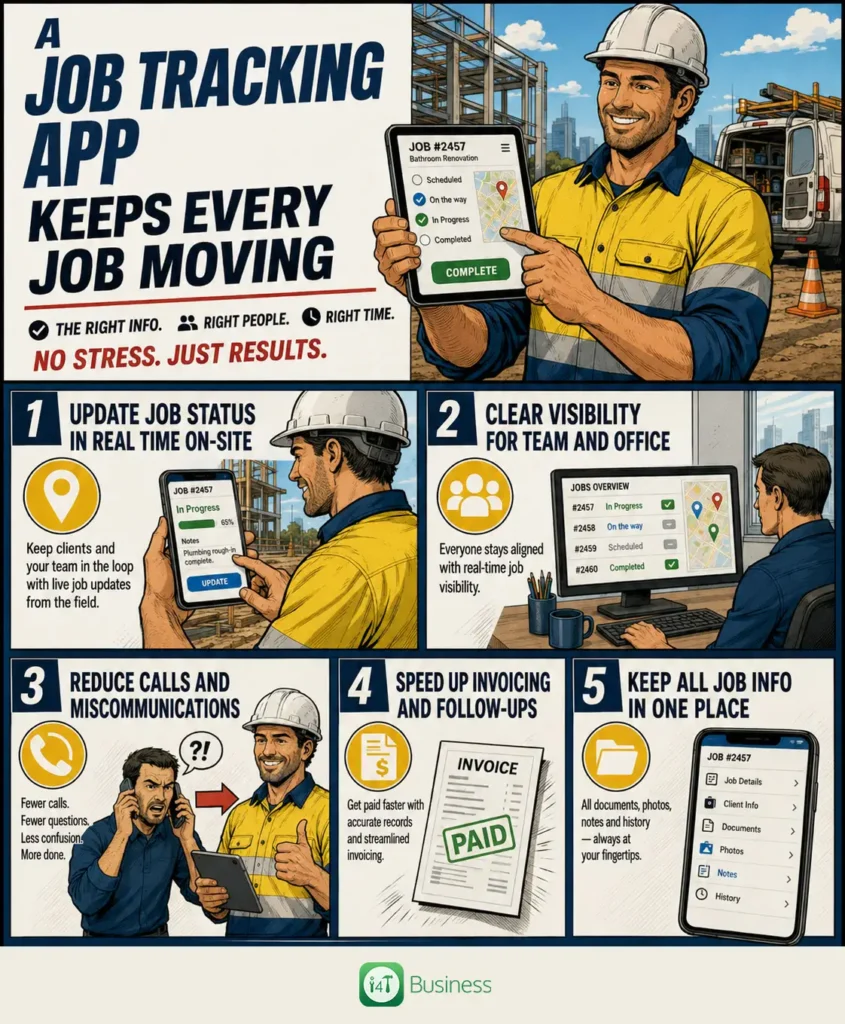
2. A job tracking app keeps every job moving
Trying to keep tabs on where every job stands can be a nightmare, especially when paper notes or calls are the only way to communicate progress. Without a central system, miscommunication leads to confusion about job status and delays in invoicing or follow-ups.
A good job tracking app changes this by letting tradies update the status of each job in real time from the field. Whether a job is scheduled, in progress, waiting on parts, completed, invoiced, or requires follow-up, this info is instantly visible to everyone involved.
This transparency reduces the need for constant calls between the office and tradies on-site. It means business owners and admin teams have instant insight into workflow, helping them plan next jobs and payments smoothly.
Take an electrician in Brisbane who marks a complex wiring job as completed, adds notes about extra parts used and flags the need for a follow-up. This saves time chasing details later and speeds up invoicing.
- Update job status in real time on-site
- Clear visibility for team and office
- Reduce calls and miscommunications
- Speed up invoicing and follow-ups
- Keep all job info in one place
3. Photos, forms, and signatures can be captured on-site
Tradies often rely on paper forms, clipboards, or separate cameras to document their work, causing job sheets, photos, and compliance documents to go missing or get lost in piles of paperwork.
Service business apps allow tradies to capture before-and-after photos, site issues, completed work, and digital forms and signatures directly on their mobile device while still on site.
This cuts down on lost paperwork and ensures every job has proof of work, approvals, and compliance details stored against it. It also boosts professionalism by making it easy to share updates with customers and office teams.
For example, a HVAC technician in Perth can snap photos showing their completed installation, capture a customer’s signature confirming the job is done, and file safety compliance forms all from the app before leaving.
With everything recorded digitally, disputes or warranty claims become easier to handle, saving time and stress.
4. Quotes and invoices can be created before leaving the job
Traditionally, preparing quotes and invoices happens back at the office after the job is done, meaning busy admin time after hours and delays in getting paid.
A tradie software app lets you create quotes, estimates, invoices, and payment requests while still on site, with features to add labour, materials, extra work items and notes as you go.
Immediate invoicing speeds up payments, reduces errors, and minimises the risk of missing billable tasks or parts. It also means customers get fast, accurate quotes without the usual wait.
For instance, a Sydney builder can finish a repair job, send an invoice with a detailed labour and material breakdown instantly, and even take payment onsite, all from one app.
This saves hours of admin and means tradies get paid faster, improving cash flow.
5. A field service mobile app makes scheduling clearer
Scheduling jobs and workers across a busy day can quickly become chaotic, especially if updates get lost between the office and field teams. Double bookings and missed appointments stall productivity and irritate customers.
A field service mobile app provides both the office and tradies in the field with a live view of schedules, job locations, worker availability, urgent callouts, and any changes or cancellations.
This greater clarity reduces phone tag, optimises dispatch decisions, and helps fit more jobs into each day. Staff can quickly reassign a nearby tradie to an urgent callout or update the schedule on the fly without confusion.
For example, an electrician in Adelaide can see an urgent job pop up nearby and accept it straight away, while the admin team can update the schedule for other tradies instantly.
With scheduling tools like these, teams maximise their working hours and keep customers happy with reliable appointments.
6. Team communication improves without constant phone calls
For busy service businesses, constant phone calls to relay job updates, clarify notes, or share photos can disrupt productivity throughout the day.
Mobile apps for tradies centralise all communication related to each job, keeping customer notes, job updates, photos, and documents linked and accessible to anyone who needs them.
This makes it easier for apprentices, technicians, admin workers, and managers to stay aligned without interrupting each other. Everyone works from the same playbook, reducing mistakes and confusion.
Consider a maintenance worker in Canberra who uploads photos of a tricky repair along with detailed notes. The office admin and business owner can review the update remotely and prepare the next steps, all without a single phone call.
By reducing disruptions and improving clarity, mobile apps help tradie teams get more done every day.
What features should mobile apps for tradies include?
Choosing the right tradie software app comes down to matching your team’s day-to-day needs. Beyond having solid scheduling and job tracking, look for features like access to customer history, quote and invoice creation, photo capture, digital forms and signatures, and GPS or location tools.
Additional handy functions include timesheets, job timers, parts tracking, offline access, team messaging, and accounting software integrations. The best mobile apps for tradies are those that are easy enough to use without dragging down your workflow.
Service business apps that cover all these bases simplify work for field teams and office staff alike, making a real difference in efficiency and accuracy.
Ultimately, the most effective tradie software app is the one that your team actually uses every day — it should make work faster, not harder.
Are mobile apps for tradies worth it for small businesses?
You might think mobile apps and tradie software are only worth it for big businesses, but that’s not the case. Sole traders and small teams face the same challenges: admin after hours, missed follow-ups, slow invoicing, lost notes, scattered photos, unclear job statuses, and customers calling for updates.
Mobile apps help smooth out these pain points, freeing up time to focus on the work itself. They reduce the risk of mistakes and lost income, even when you’re juggling every role yourself.
Small teams using service business apps often find their admin hours shrink and their cash flow improves, giving them more time to grow the business or enjoy a better work-life balance.
Final takeaway
Mobile apps for tradies offer much more than just one useful feature. Their real power comes from removing small delays across the entire job workflow — from preparation and scheduling to completing work, staying connected, and invoicing promptly.
Working faster on-site isn’t just about speed; it’s about having every job detail, photo, quote, and update in one place at your fingertips. This means fewer trips back to the office, less admin after hours, clearer communication, and quicker payments.
If your team is ready to spend less time chasing job details and more time getting work done, i4T Business Job Management Software can help you manage jobs, track progress, and keep your field team organised from one place.
Frequently Asked Questions
Mobile apps for tradies are software applications designed to help tradespeople manage jobs, communicate with teams, track time, create quotes and invoices, and access job details directly from their mobile devices.
A field service mobile app saves time by providing up-to-date scheduling, job status updates, and team communication in real time, reducing phone calls and preventing double bookings or delays.
A job tracking app lets tradies update the progress of jobs in real time, helping everyone stay informed about what’s scheduled, in progress, completed, or waiting on parts, which keeps work flowing efficiently.
Yes, mobile apps for tradies often feature quoting and invoicing tools that allow tradies to generate and send invoices directly on-site, speeding up billing and payment processes.
Absolutely. Service business apps help sole traders reduce admin time, keep notes and photos organised, track jobs easily, and improve communication — all essential for smoother operations.
Look for an app that is easy to use daily and includes features like scheduling, job tracking, quoting, invoicing, photo and form capture, team messaging, offline access, and integration with your existing accounting tools.