
TL;DR
A strong tradie website checklist in Australia comes down to four things:
- The right pages
- Clear copy
- Visible trust builders
- An easy booking flow.
At minimum, include a Home page, Services plus individual service pages, Service Areas, About, Reviews, Gallery/Projects, FAQs, and a Contact/Book page.
Keep your wording simple and specific, show proof like licences, insurance mentions, real photos and genuine reviews, and make it effortless to call or request a quote on mobile. If you display pricing, be clear and accurate, and be mindful of privacy when collecting customer details.
A tradie website doesn’t need to win design awards. It needs to do one job really well: turn a curious visitor into a confident customer who’s ready to call or book. In Australia, most people searching for an electrician or plumber are doing it on their phone, often while the problem is happening. They’ll skim your site in under a minute, compare you with one or two others, and make a quick judgement based on clarity and trust.
That’s why this tradie website checklist in Australia focuses on what actually moves the needle: having the right pages, writing copy that sounds like a real human, adding trust signals customers look for, and creating a booking flow that doesn’t feel like hard work. If you’re an electrician, plumber, or any service tradie, this will help you build a simple, solid website that earns enquiries.
What pages should a tradie website in Australia include as a minimum?
Think of your website like a good onsite quote. You don’t ramble. You explain what you do, what it’ll involve, what the customer can expect, and how to go ahead. A website should do the same, just faster.
At a minimum, your site should include a homepage, a services section, and a clear way to contact you. But the best-performing tradie websites don’t stop there. They also include pages that answer the questions customers are too tired or unsure to ask on the phone.
A strong foundation usually looks like this:
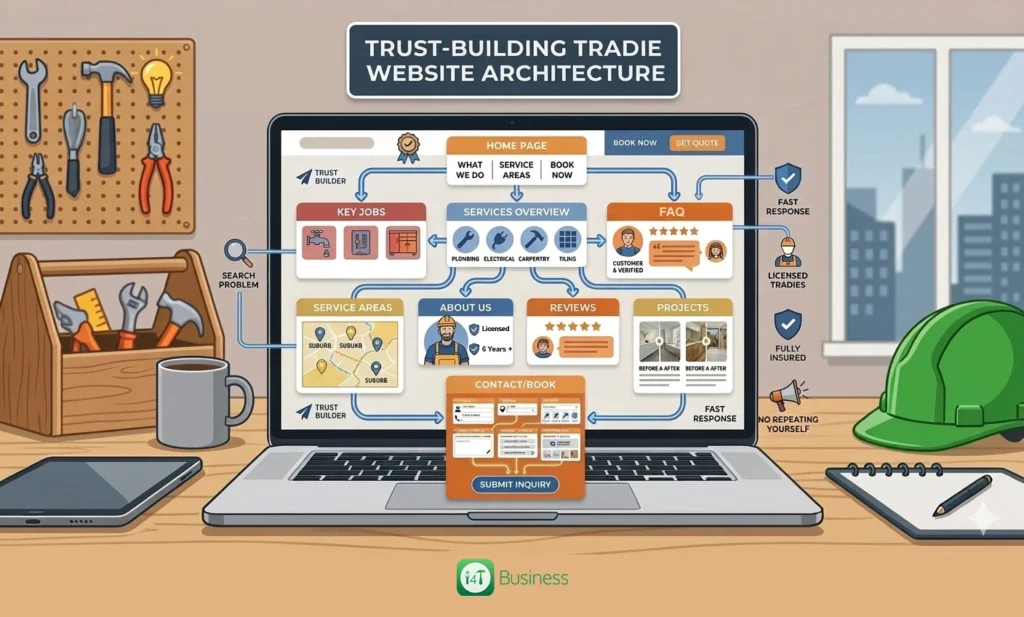
- A Home page that quickly explains what you do, where you work, and how to book you
- A Services page that lists your main services and links to deeper service pages
- Individual service pages for your key jobs, because customers search for specific problems
- A Service Areas page that confirms suburbs and travel boundaries
- An About page that helps people feel like they’re hiring a genuine operator
- A Reviews page that shows proof from real customers
- A Gallery or Projects page with before-and-after photos and short job write-ups
- An FAQ page that reduces hesitation and saves you from repeating yourself
- A Contact or Book page that makes the next step obvious
If you do emergency work, add a dedicated after-hours page so customers don’t have to guess whether you’re available. If you’re growing the team, a quick careers page can also help, but only if hiring is actually a priority.
What should your homepage say so people trust you in 10 seconds?
Your homepage is your first impression, and customers are ruthless. They’re not trying to be mean; they’re just busy and slightly stressed because something’s broken, leaking, sparking, or not working. If your homepage is vague, cluttered, or slow to load, they’ll bounce.
A high-performing homepage does a few simple things in order. First, it clearly says what you do and where you do it. That’s your headline. Then it shows your main services so people can quickly see if you handle their type of job. After that, it builds trust with proof, and repeats a clear call-to-action so they know exactly how to move forward.
A good homepage doesn’t need a wall of text. It needs clear, helpful wording like you’d say to a customer in real life. For example, instead of saying quality service at competitive prices, you can explain what customers actually get: licensed work, upfront quoting, tidy clean-up, and a clear timeframe.
If you want a simple formula, your top section should cover these four points in plain English: what you do, where you service, why you’re reliable, and how to book you. Everything else supports that.
How do you structure service pages so they actually convert?
Service pages are where enquiries are won or lost. A customer searching blocked drain plumber or switchboard upgrade electrician isn’t looking for a generic paragraph. They want to know if you solve that exact problem and whether you sound like someone they can trust in their home or workplace.
The best service pages feel like a calm explanation. You name the problem, explain what causes it, outline what you’ll do, and set expectations for time and cost. Then you make booking easy.
Instead of listing features, describe the experience. Mention that you’ll show up on time, explain the fix before you start, keep things tidy, and test properly before you leave. That sort of detail does more for trust than any fancy badge.
Where it helps, you can include a short list, but keep it focused. For example, an electrician’s fault-finding page might include a quick list of common symptoms people recognise, like flickering lights, tripping safety switches, or partial power loss. The rest should be descriptive: what those symptoms may mean, why it needs a licensed tradie, and what happens when you attend.
Each service page should finish with one strong next step. Don’t make people choose between five buttons. Pick your main action, and repeat it consistently.
What are the best website pages for electricians and plumbers?
When people talk about the best website pages for electricians and plumbers, they usually mean pages that match what customers actually search for. A generic services page is fine, but individual pages for your main job types help you show up in search results and convert better because the customer feels understood.
For electricians, pages that often perform well are things like fault finding, switchboard upgrades, smoke alarms, lighting and fans, EV chargers, and safety inspections. For plumbers, high-intent pages include blocked drains, hot water systems, burst pipes, leaking taps and toilets, and gas fitting if you’re licensed.
You don’t need to build a page for every tiny service. Start with the jobs you want more of and the ones customers commonly search for. Even six strong service pages can make a noticeable difference, especially if the copy is clear and you’ve got photos and reviews to back it up.
What should your “Service Areas” page include without looking spammy?
A service areas page should feel helpful, not dodgy. Customers just want to confirm you service their suburb and understand any boundaries. If you get this right, you reduce wasted calls and improve your chances of being shortlisted.
Make the page easy to skim. Start with your main service region, then list suburbs in grouped sections so it’s readable. If you charge travel fees or have after-hours limits, mention it clearly and politely. That’s not a turn-off. It actually builds trust because it shows you’re upfront.
The strongest service areas pages also include a bit of local proof. That might be a few reviews that mention suburbs, or a couple of recent job photos with short captions showing where the work happened. It makes you feel established in the area, not like a random listing.
What trust builders should be on every page of your tradie site?
Trust isn’t one thing. It’s the overall feeling your site creates. In Australia, customers often look for signs that you’re licensed, insured, established, and easy to deal with. They also want to feel safe letting you onto their property.
The most effective trust builders are simple and practical. Mention licensing and qualifications where relevant, and include your licence number if appropriate for your trade and state requirements. Add an insurance mention, and include your ABN in the footer. Use real photos of your work and your team rather than generic stock images. Show a few genuine reviews and link to the source so it feels legitimate.
Another underrated trust builder is clarity. If your site clearly explains what happens next, response times, and how quoting works, customers feel calmer. Calm customers enquire.
How do you use reviews and claims safely in Australia?
Reviews are one of the strongest conversion tools you’ve got, but they need to be handled properly. The ACCC warns businesses against misleading review practices and fake testimonials, and it’s not worth risking your reputation or compliance. Keep your reviews genuine, don’t edit them to change meaning, and avoid anything that looks staged.
The same goes for marketing claims. If you say you’re the cheapest, fastest, or number one, you need to be able to prove it. A safer approach is to write specific, honest claims that customers care about. For example, talk about being licensed, giving clear quotes, turning up when you say you will, and leaving the place tidy. ACCC guidance on misleading claims backs the idea that advertising should be truthful and accurate.
This isn’t about being boring. It’s about being believable. Believable wins jobs.
What photos and project examples build the most trust?
Tradies often underestimate how much photos sell the job. Customers don’t just want to read what you do. They want to see that you do it well, and that your work looks tidy and professional.
Before-and-after photos are gold, especially when they’re paired with a short description. You don’t need a full essay. Just explain the problem, what you did, and the outcome. These quick job snapshots help customers imagine you solving their problem too.
If you can, include variety. Show a few different job types, and keep adding new photos over time. A gallery that hasn’t changed in three years makes people wonder if you’re still active. A gallery with recent work builds confidence.
What should your booking flow look like for the highest conversion?
Your booking flow is where most tradie websites quietly fail. Not because the tradie isn’t good, but because the site makes it hard to take the next step.
Make booking feel simple. Your phone number should be prominent and clickable on mobile. Your main call-to-action should be consistent across the site, so customers don’t have to think. If you use a form, keep it short and practical.
A sensible enquiry form usually asks for:
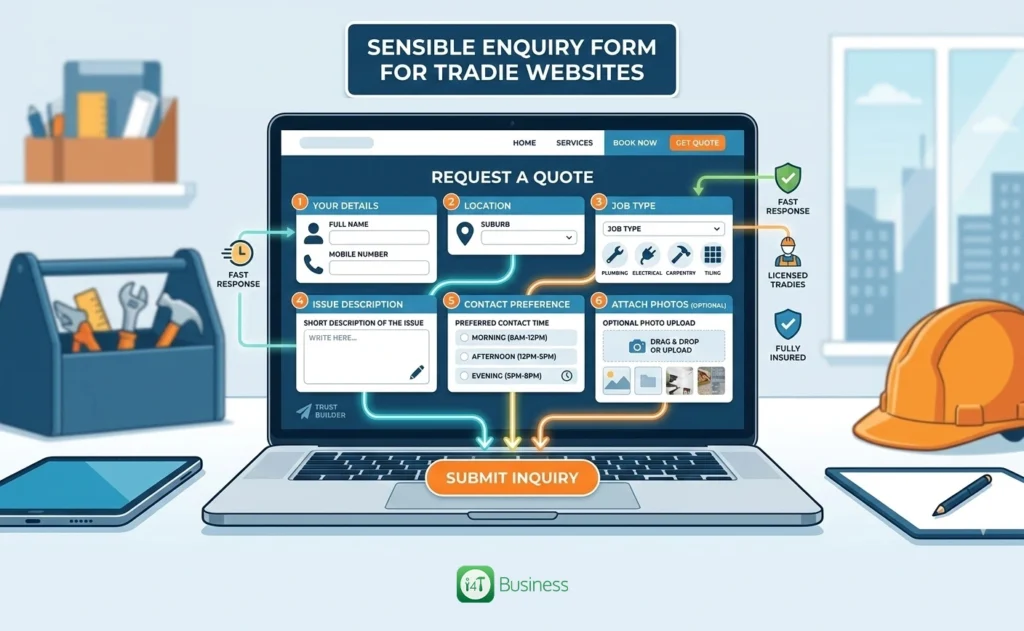
- Name and mobile number
- Suburb
- Job type
- Short description of the issue
- Preferred contact time
- Optional photo upload
After someone submits, don’t leave them hanging. Show a clear confirmation message that explains what happens next and when you’ll respond. That reassurance reduces double submissions, follow-up calls, and customer anxiety.
What legal, privacy and pricing basics should you include in Australia?
You don’t need a massive legal section, but you do need the basics. If you collect personal information through a contact form, it’s smart to be mindful of privacy obligations and be transparent about handling customer details. The OAIC outlines the Australian Privacy Principles, which are the key standards around collecting and managing personal information.
Pricing is another area where clarity builds trust. If you display prices, make sure they’re clear and not misleading. Australian business guidance notes that displayed prices should include the total price with taxes and other mandatory charges. For tradies, that means being upfront about call-out fees, after-hours rates, and what’s included.
If pricing varies based on site conditions, say that clearly and explain what affects the quote. Most customers accept that, as long as you’re transparent.
A website that earns enquiries, not just compliments
A strong tradie website isn’t complicated. It’s a simple system: the right pages, clear copy, trust signals that feel real, and a booking flow that’s easy on mobile. If you follow this checklist, you’ll end up with a site that feels like a professional tradie business, not just a digital business card.
If you want a straightforward way to get a tradie website set up without the usual hassle, use i4T Business and add a tradie website to your pricing plan. You’ll be able to get a professional website up and running in just 2 days.
FAQs
Home, Services (plus key service pages), Service Areas, About, Reviews, Gallery/Projects, FAQs, and Contact/Book Online.
Pages for the jobs people search for most, like fault finding, switchboard upgrades, blocked drains, hot water systems, burst pipes, and emergency call-outs.
Start with 6–10 pages for your main money-makers, then add more based on what customers ask for and what you want more of.
Clear licence details where relevant, insurance mention, ABN in the footer, real job photos, and genuine reviews with a clear booking option.
Tap-to-call on mobile, one clear call-to-action, a short form with only essential fields, and a confirmation message telling customers what happens next.
Hot off the press!