

TL;DR
Running jobs across notes, texts, spreadsheets, and separate invoicing tools creates double handling and missed billables. The easiest fix is using job management software for tradies that links every step in one workflow, including customer details, quote, job details, invoice, and payment.
When you manage jobs and invoices in one app inside a field service management system, you can send quotes faster, track job progress in one timeline, capture labour/materials/variations on-site, and convert approved quotes into invoices without retyping. That means fewer mistakes, cleaner records, and faster payments.
If you want everything in one place, i4T Business helps tradies manage job management, quoting, and invoicing end-to-end in one system.
If your quoting lives in one place, job notes live in another, and invoicing happens whenever you finally get a quiet night… you’re not doing it wrong. You’re just running a busy trade business with too many moving parts.
The clean fix is getting everything connected in one workflow from customer to quote, job, invoice, and payment. That’s exactly what job management software for tradies is meant to do. Instead of retyping details, chasing photos, or forgetting variations, you run the whole job inside an all-in-one trade business software platform.
In this guide, we’ll walk through everything you need to choose the right field service management system and figure out how to manage quotes and invoices digitally using job tracking and invoicing software in Australia.
What is the best way for tradies to manage jobs, quotes, and invoices in one system?
The best way is to keep quotes, job details, and invoices linked to the same customer record and the same job number, so nothing gets lost between steps. In practice, that means the quote you send is connected to the job your team completes, and the invoice pulls directly from what was quoted and what was actually done.
When everything’s connected, you stop doing double-handling. Customer details don’t get typed three times. The scope doesn’t change without being captured. And your invoice reflects the real job, not whatever you can remember at the end of the week.
What does an all-in-one trade business software app actually do?
An all-in-one trade business software app brings the core parts of running a trade business into one place, so the job doesn’t fall apart the moment you get busy.
Most tradies don’t need ten different tools. They need one system that holds:
- customer details and site info
- quoting and approvals
- scheduling and job tracking
- job notes, photos, checklists, and variations
- invoicing, payments, and follow-ups
Done properly, it feels like a single job timeline. You open the job, and everything is there: what was quoted, when it’s booked, what needs doing, what changed on-site, and what’s been invoiced.
How do tradies manage quotes and invoices digitally without double-handling?
The key is building quotes in a way that your invoice is basically already prepared. If you’re manually rewriting the same line items later, you’ll lose time, and you’ll eventually miss money.
A smoother approach is to create quote templates for your common jobs, keep your labour rates and common materials ready, and use a consistent format that makes approvals simple. Once the customer approves it, you convert it into a job. When the job is complete, you convert it into an invoice without retyping.
This is the practical version of how to manage quotes and invoices digitally: one set of information, used all the way through, without starting from scratch at each step.
How can I track jobs from booking to completion in one app?
You track jobs properly by giving every job a clear status and keeping all the important info inside the job record (not split across messages, notebooks, and camera rolls).
A good “one app” workflow usually looks like this: booked, on the way, in progress, waiting on parts, completed, invoiced, and paid. That’s not fancy. It’s just clear.
The real benefit is what sits behind the status. When you can open the job and see the schedule, job notes, photos, customer comms, and what’s been approved, you don’t waste time searching. That’s when you truly manage jobs and invoices in one app, not just “use an app sometimes”.
How do I turn a quote into a job, and then into an invoice automatically?
You want a system where the quote is the foundation, not a separate document that disappears once the customer says yes.
Once approved, the quote should become the job. The scope, items, and pricing should carry through. Then, when it’s time to invoice, you shouldn’t be recreating the job again. You should be confirming what changed, adding anything extra, and sending it.
This approach also supports cleaner invoicing habits. Business.gov.au outlines what a tax invoice needs to include and notes that invoices over $1,000 must include the buyer’s identity or ABN, which is much easier when your software templates it properly.
How can I capture labour, materials, and variations on-site so I don’t miss billables?
This is where profit leaks in quiet little drips. Ten minutes here, a fitting there, a quick extra task you didn’t quote for… and suddenly the job’s done, but the invoice doesn’t match the effort.
The best habit is capturing the details while you’re still on-site and the job is fresh:
- log labour as you go, even quick entries help
- add materials used the moment they’re installed
- record variations when they happen, ideally with a note and a photo
- confirm the customer’s approval for the variation before you roll on
When your field service management system makes this easy, your invoice becomes a straightforward summary of the job instead of a stressful reconstruction exercise later.
What needs to be on an Australian tax invoice, and how do I make sure it’s compliant?
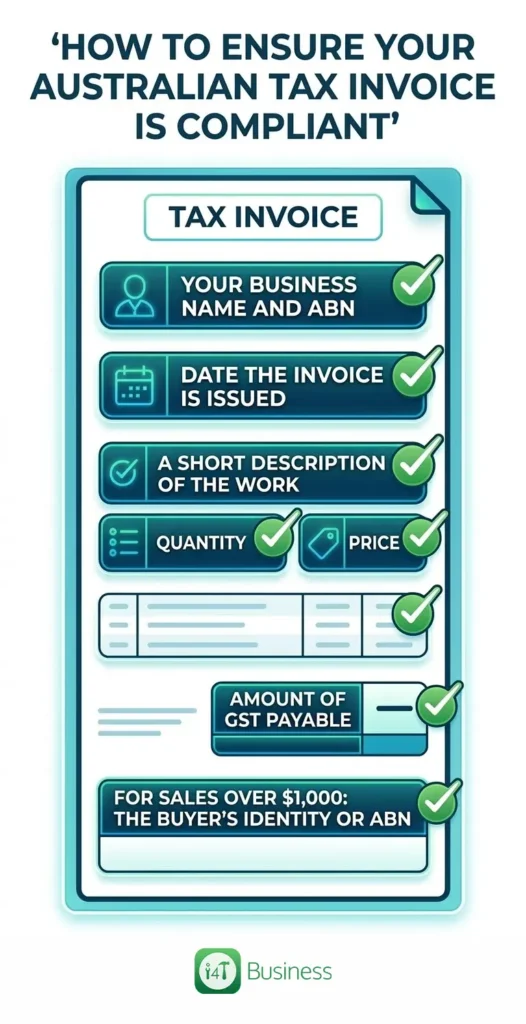
If you’re registered for GST, your “invoice” often needs to be a tax invoice, and there are specific details that must be included. Business.gov.au lists the required tax invoice details, including the words “tax invoice”, your business name and ABN, the issue date, a description of what you sold, and the GST amount (if any). It also states you must include the buyer’s identity or ABN on invoices for sales over $1,000.
To keep it simple, here’s a minimal compliance checklist:
- the words tax invoice
- your business name and ABN
- the date the invoice is issued
- a short description of the work, including quantity and price
- the amount of GST payable
- for sales over $1,000: the buyer’s identity or ABN
Timing matters too. The ATO explains that if a customer asks for a tax invoice, you must provide it within 28 days, with an exception for very small sales.
The practical takeaway: a digital system with templates and the right fields helps you stay consistent, avoid rework, and look more professional without you having to memorise rules.
How do I send invoices from the field and get paid faster?
Getting paid faster isn’t magic. It’s usually three things: speed, clarity, and convenience.
Speed means sending the invoice as soon as the job is finished, or at least the same day. Clarity means the invoice clearly explains what was done and what’s due, with clean line items and terms. Convenience means giving customers an easy way to pay.
In the real world, the “fast payment” version looks like this: the customer gets the invoice while they still remember the job, it’s easy to understand, and paying it doesn’t take effort. That’s how job tracking and invoicing software in Australia can improve cash flow without you becoming a full-time debt collector.
How should tradies store invoices, job notes, and receipts for BAS and tax time?
You store them in a way that’s easy to retrieve, secure, and consistent. That usually means one place where invoices, quotes, job notes, photos, and receipts are attached to the job or customer record.
On the rules side, you need to keep most business records for 5 years, and some for longer depending on the record type. The ATO also explains record-keeping expectations and timeframes.
On the practical side, digital recordkeeping is fine when done properly. You can scan or photograph receipts and documents, and you don’t need to keep paper copies if you have a digital record.
So the best setup is one that keeps job history tidy now, and makes tax time far less painful later.
What features should I look for in job management software for tradies in Australia?
When you’re comparing job management software for tradies, ignore the flashy stuff first and focus on what stops admin blowouts and missed revenue.
Look for software that makes quoting and invoicing feel like one connected flow, with job tracking in the middle. A short “must-have” list is helpful here:
- fast quoting with templates and easy edits
- simple job scheduling and status tracking
- job notes, photos, and checklists stored inside the job
- convert quote, job, and invoice without retyping
- variation capture so extras don’t get forgotten
- clear tax invoice fields, including ABN and GST
- easy payment details and invoice follow-ups
If it’s not easy to use on the phone while you’re on the tools, it won’t stick. The best system is the one your whole team will actually use every day.
One system, fewer headaches, better cash flow e
If you want to run tighter jobs, send cleaner quotes, and invoice faster, the goal is simple: stop letting the job live in five different places. When you manage jobs and invoices in one app, you cut rework, reduce mistakes, and make it easier to get paid on time.
If you’re ready to bring job management, quoting, and invoicing together, i4T Business is built as a field service management system that keeps everything connected from quote to job to invoice, all in one place.
Book a demo today.
FAQs
Yes, consistent-looking quotes/invoices, clearer job details, and faster paperwork usually boost trust and reduce back-and-forth.
Most systems let you set user permissions, so techs can see what they need while sensitive pricing stays restricted.
You can usually finish current jobs and start new ones in the new system, then gradually migrate customers and templates over.
Yes, a field service management system lets you can reuse job templates and customer history, which makes repeat work quicker to book and easier to price.
For most tradies, the basics click quickly once templates are set up and you’ve run a few jobs end-to-end in the system.
Hot off the press!